

How To Change A Header Logo
DB
Duane Bryan
This may be a basic question but how do you change the logo in the Restora template?
Website
http://www.dough-house.co.uk
10 Answers
Order by
Oldest

Ariba
Accepted AnswerHello
Thank you for your query.
Kindly check the short video below, it will help you: https://www.youtube.com/watch?v=8M57SVUuyEo
Ariba
Accepted AnswerYou can also check the documentation and screenshot below:
https://www.joomshaper.com/documentation/helix-framework/helixultimate/basic-settings
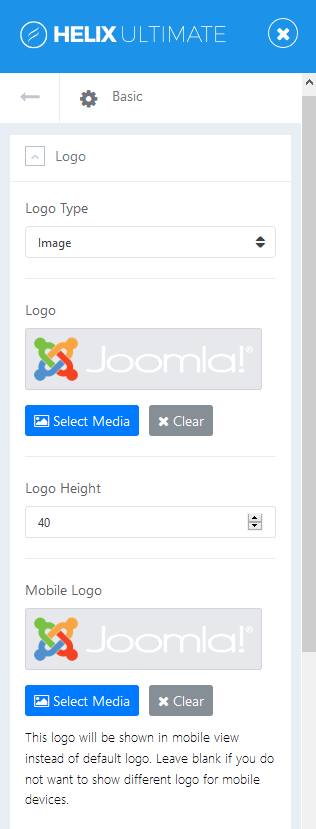
Ariba
Accepted AnswerPlease log in to your Joomla admin panel.
Then go to Extensions -> Templates -> Styles
Then select your Template. After that select Template options and this option will appear like shown in the screenshot earlier.
DB
Duane Bryan
Accepted AnswerCan you change the logo in the existing Restora Template? I have been trying to find an option to do this for days now? Is this possible?
Ariba
Accepted AnswerYes you can change the existing logo. You are most welcome.
I am sorry, i could not understand the last question.
Ariba
Accepted AnswerYou are most welcome.
Please do let me know if i can help you with anything else.