Dear PageBuilder Team,
Unfortunately, I am unable to install the new version 6.10.0. I receive the following message: "Forbidden – You don't have permission to access this resource." I have tried this on different domains, and I get the same message every time! What can I do? Best regards, Tom
Staff replied
SP Page Builder
v6.20
I cannot install the PageBuilder.
9 replies

Atick Eashrak Shuvo Staff
Hi Tom,
Thank you for reaching out, and we're sorry to hear that you're experiencing this issue.
Could you please clarify where you encounter the “Forbidden – You don't have permission to access this resource” error? For example, does it occur when downloading SP Page Builder 6.10.0 from our website, or when installing it through your Joomla administrator panel?
This information will help us investigate the issue and guide you toward the appropriate solution.
We look forward to your response.
Best regards
Thomas Asked this
Hi Atick,
The problem occurs during installation via the Joomla administration backend! Joomla starts the installation briefly and then displays the following message:
"Forbidden - You don't have permission to access this resource"
Best regards, Tom
Atick Eashrak Shuvo Staff
Hi Tom,
Thank you for the clarification.
Could you please let us know which method you are using to update SP Page Builder? Are you updating it through the Joomla Update component, or are you downloading the extension package and updating it via System → Install → Extensions in the Joomla administrator panel?
This will help us narrow down the cause of the issue.
We look forward to your response.
Best regards

Paul Frankowski Senior Staff
3 days ago
· edited
Hi Tom.
Can you install any other extension on the same website? If not, it means that somebody(?) disabled that feature in the Joomla Access area. Or it was disabled in the firewall settings.
Later, You can also make 2nd test. On a subdomain on the same server. Install a clean Joomla and then try to install SPPB.
Thomas Asked this
Hi Atick,
I’m performing the update via System → Install → Extensions in the Joomla administration area!
Best regards, Tom
Paul Frankowski Senior Staff
This is the simplest method that works in Joomla and WordPress.
Thomas Asked this
Hi Paul.
Yes, I can install everything except PageBuilder; it doesn't work even with a fresh installation.
Paul Frankowski Senior Staff
3 days ago
· edited
Try 2nd method
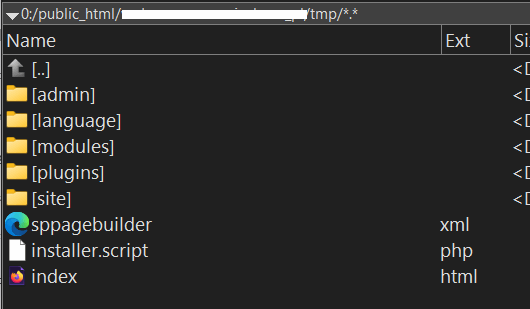
- Unzip SPPB package in /tmp folder (use FTP or File Manager from cPanel)
- Disable the Joomla Cache system in Global Configuration for a while
- Then, in Joomla Installer, choose Install from folder, then click Install
step1:
Thomas Asked this
Thank you very much, that worked!
Paul Frankowski Senior Staff
If the above will help, please contact Hosting support - and check the server logs, why it refuses to install from a typical zip file. It may looks that filename is "banned".
BTW
Do you have any Firewall component installed?
Log in to reply.