

Customize Url Structure In Articles
HS
HUMBERTO ENRIQUESANDOVAL SMITH
How do I make the structure of the articles in the url show the category + the name of the article and not show how it is now https://snipboard.io/WU6V8p.jpg Template: NewEdge, Joomla: Version: 3.9.26 template: Version: 2.5. SP Page Builder Pro: Version: 3.7.11

Website
https://nocperu.com
34 Answers
Order by
Oldest

Ariba
Accepted AnswerHello
Thank you for the screenshot. Can you kindly check your site url? I am unable to load it from my side.
HS
HUMBERTO ENRIQUESANDOVAL SMITH
Accepted Answer Ariba
Accepted AnswerCan you kindly go through our blog link first? https://www.joomshaper.com/blog/making-joomla-site-seo-friendly-by-removing-id-from-urls
Have you tried following the steps here?
Ariba
Accepted AnswerThank you, please do let me know, i am here to assist if it doesn't solve the issue :)
HS
HUMBERTO ENRIQUESANDOVAL SMITH
Accepted Answerit show me error https://snipboard.io/4Jz5P7.jpg

I am using an additional article in sp builder https://snipboard.io/XRD9YU.jpg

HS
HUMBERTO ENRIQUESANDOVAL SMITH
Accepted Answerand if I activate it in yes here https://snipboard.io/PtpYzL.jpg It show me error - the site goes down https://snipboard.io/lMCukO.jpg


Ariba
Accepted AnswerCan you please provide me your administrative access? Use the hidden mode to share the log in credentials please.
Ariba
Accepted AnswerHello
When you get 404 error after applying settings from this link -
https://www.joomshaper.com/blog/making-joomla-site-seo-friendly-by-removing-id-from-urls
you can follow this link to fix them -
HS
HUMBERTO ENRIQUESANDOVAL SMITH
Accepted AnswerI can't find the solution to my initial question after applying settings from this link - https://www.joomshaper.com/blog/making-joomla-site-seo-friendly-by-removing-id-from-urls it is shows error https://snipboard.io/Kc6x5B.jpg it is other type of error

HS
HUMBERTO ENRIQUESANDOVAL SMITH
Accepted Answerapplying settings from this link - https://www.joomshaper.com/blog/fix-broken-links-on-joomla I am not solving my initial question https://snipboard.io/wBDQAu.jpg

HS
HUMBERTO ENRIQUESANDOVAL SMITH
Accepted Answerthere is no other way to make the articles with the following structure, like the newedge template example https://snipboard.io/CqjmXK.jpg

Ariba
Accepted AnswerThank you for your patience.
You can search for a suitable extension in JED in order to do this, for example like the one in the link below: https://extensions.joomla.org/extension/sh404sef/
HS
HUMBERTO ENRIQUESANDOVAL SMITH
Accepted AnswerI do not know about configuration extension. please can you help me please
Ariba
Accepted AnswerI am sorry but customization support is prohibited, we can only provide suggestion on this matter. Kindly go through our support policy https://www.joomshaper.com/support-policy
HS
HUMBERTO ENRIQUESANDOVAL SMITH
Accepted AnswerI know, but the problem it is with sp builder and template newedge
Ariba
Accepted AnswerCan you please follow this link: https://www.joomshaper.com/blog/make-your-joomla-site-seo-friendly Changing htaccess file matters here as well. Please go through the link
HS
HUMBERTO ENRIQUESANDOVAL SMITH
Accepted AnswerAlready I removed the index.html https://snipboard.io/gsjR54.jpg but I can not remove id of the url https://snipboard.io/vkVMfU.jpg I can't solve my initial question



Ofi Khan
Accepted AnswerHello HUMBERTO ENRIQUESANDOVAL SMITH
Please go to Article settings and set URL Routing to Modern and hide the id number. Then under your public_html folder rename htaccess.txt file to .htaccess
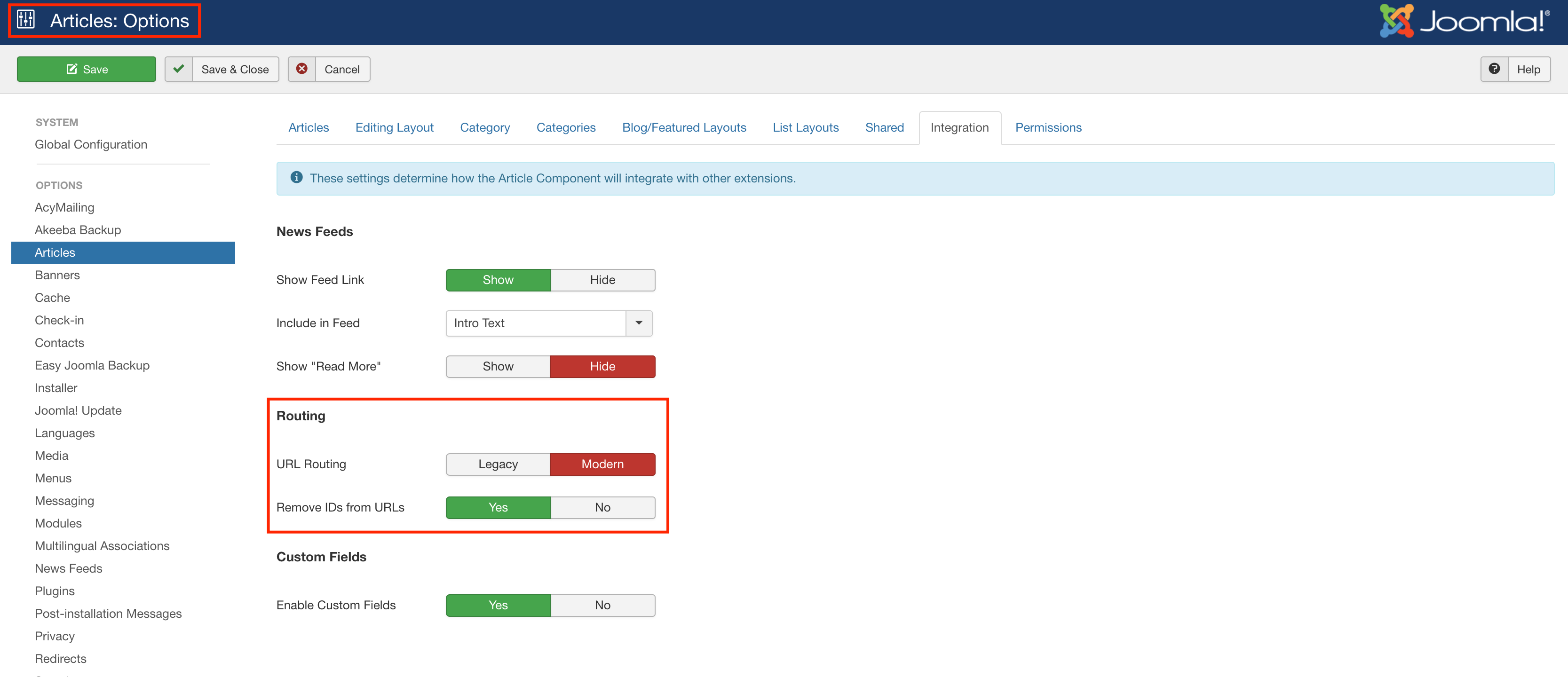
Best regards
HS
HUMBERTO ENRIQUESANDOVAL SMITH
Accepted AnswerHello Ofi Khan already I changed the file - https://snipboard.io/Jrnq75.jpg - and I have the next configuration in the Article settings - https://snipboard.io/5Cxfkv.jpg - but when I select an article . It is show the next error - https://snipboard.io/4DH2Jw.jpg - please can you help me


Ofi Khan
Accepted AnswerPlease share your FTP details here to check the issue. Use the Hidden Content box to share the credentials.
Ofi Khan
Accepted AnswerPlease avoid the special addons developed for Newedge. The addons are Latest Post, Latest Video, Newedge Slider, Thumb Gallery. These are having issues. Developers will review the addons and release an update. Until then, please do not use these. I have added a section with Article addon (currently hidden) on the homepage. From the addon, if you click on Article, the link works. Please check that section and use Articles addon.
Ofi Khan
Accepted AnswerI have a humble request. It would be very kind of you if you can manage some moment to give us feedback here: