

Remove Menu On Helix Ultimate Template
SP
Shawngela Pierce
I would like to use the template on a couple of pages as a landing page. As such, I would like to remove the menu. Can I get some assistance on how to do this?
Thanks!
Website
https://seekwithinyou.com
4 Answers
Order by
Oldest

Ariba
Accepted AnswerPlease go to custom css section of your landing page's template and insert the following css rule. It will hide the menu.
#sp-menu {
    display: none;
}
Or,
You can go to landing page's template options -> layout builder and disable the predefined header. Then add a row for your logo and another for top bar (social icons & contact info)
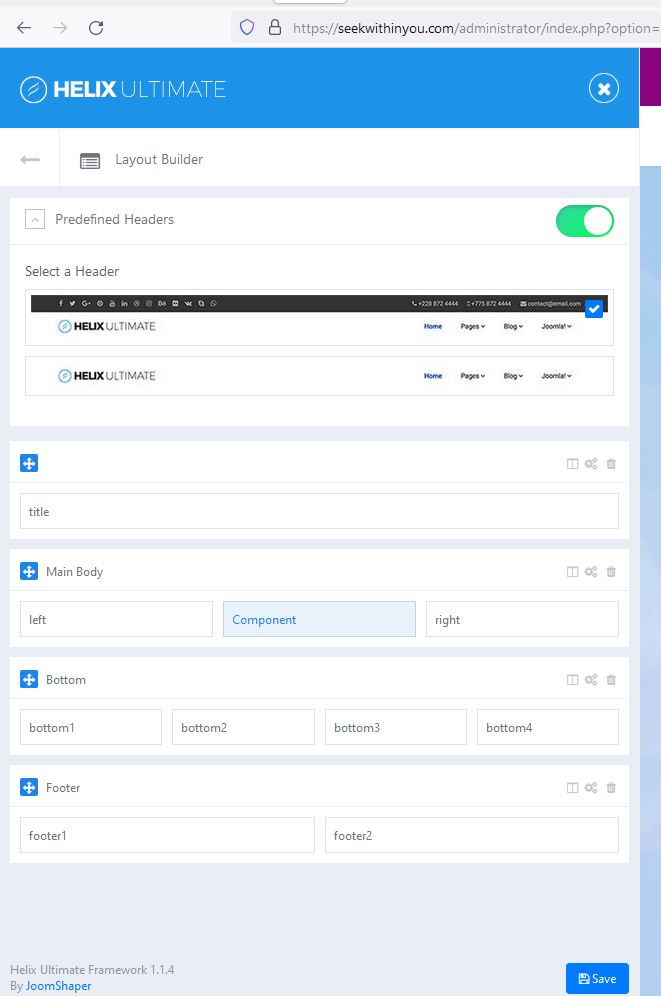
Kindly do let me know if that works.
Ariba
Accepted AnswerHello
Thank you for your query & providing the admin access.
Let me have a look.
SP
Shawngela Pierce
Accepted AnswerThat is perfect! Disabling the header is all I needed. Thank you!