

Dont´t Load Custom.css
MT
Martin T.
Hi Support,
I have just made an update to the current Joomla version 3.10.1 and the current Helix version. Now the Custom.css is no longer loaded. I also cleared the cache in Joomla etc. Without success I mean the custom.css file /templates/shaper_restora/css/custom.css
27 Answers
Order by
Oldest

Toufiq
Accepted AnswerWe have fixed our developer environment. Please hold on for the next update. Thanks

Muntasir Sakib
Accepted AnswerHello Martin,
What's the exact problem you are facing? Where did you add CSS, would you mind sharing a screenshot of that as it is working completely fine from our end.
Thanks!
Toufiq
Accepted AnswerHi there,
Thanks for contacting us. Sorry for the inconvenience. There is no custom.css file found.
-Thanks
TE
Thomas Exner
Accepted AnswerHi, On my website there is the same problem. I have already cleared the Joomla and Browser cache but the custom.css is not loaded.
MT
Martin T.
Accepted Answeryes that's exactly my problem :-). the custom.css is not loaded. the file is in the folder. you can test it via the following link https://www.karlsruherhof.de/templates/shaper_restora/css/custom.css
MG
M Ghani
Accepted AnswerHi,
I am facing same issue custom.css file is not loading but if you can copy your all css code then put in joomla backend Helix Ultimate template text box... its should be work ......
Regards, Sohail

Joomla! Man
Accepted AnswerTry In the Helix Ultimate Template settings (extensions < themis < Helix Ultimate), you will find the "Custom Code" tab on the left side. The top field is "Before /head" and in there, you just need to add:
<link href="/templates/shaper_restora/css/custom.css" rel="stylesheet" type="text/css" />
Or temporary copy and paste your code inside custom.css tab
https://www.karlsruherhof.de/templates/shaper_restora/css/custom.css
Thanks
Toufiq
Accepted Answer
DB
Dietmar Bauckhage
Accepted AnswerSame problem here. Alle updates went fine incl. Joomla 3.10.1. After update "System - Helix Ultimate Framework 2.0.1" custom.css (/templates/themis/css/custom.css) will no longer be loaded.
MT
Martin T.
Accepted Answercustom.css is not loaded yet. Now the colors are mixed up too. Text is now red. Menu colors are yellow. Some parts are highlighted in gray. ADD Comment: apparently the Custom.css is loaded but it is now empty. I need the custom.css from me and the settings as they were with all the colors.

Pavel
Accepted Answeryes that's exactly my problem :-). the custom.css is not loaded. the file is in the folder. you can test it via the following link https://www.karlsruherhof.de/templates/shaper_restora/css/custom.css
Hi. I see in this example that custom.css works fine. Just your code is not strong enough to override the code from default.css
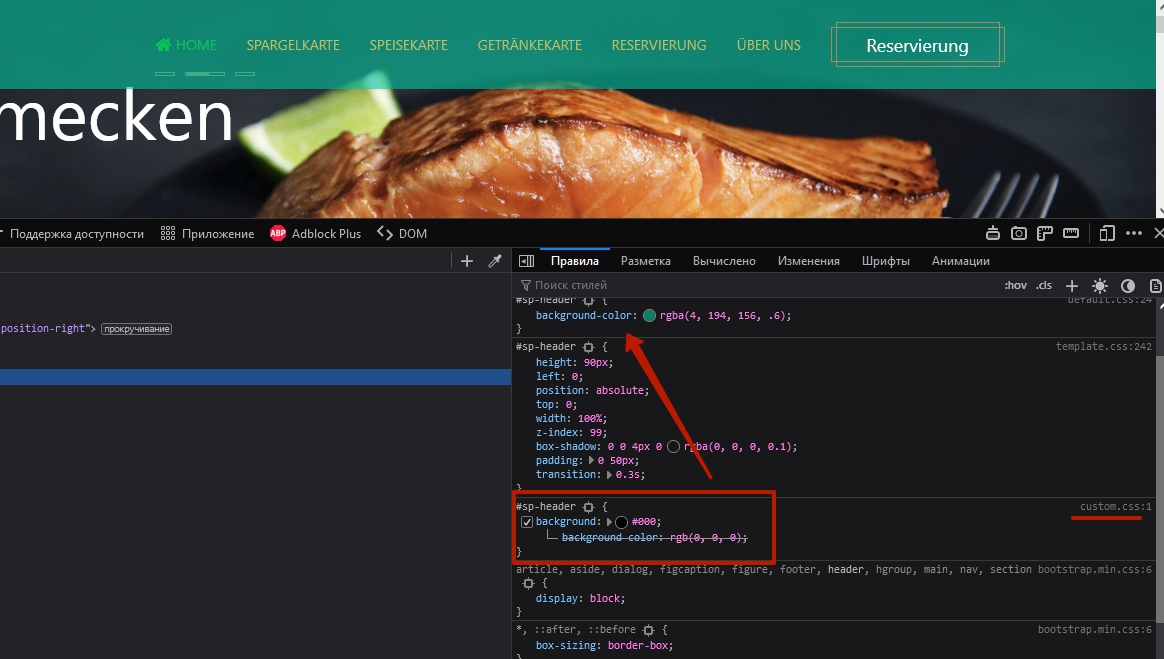 If you set it up so, it will work.
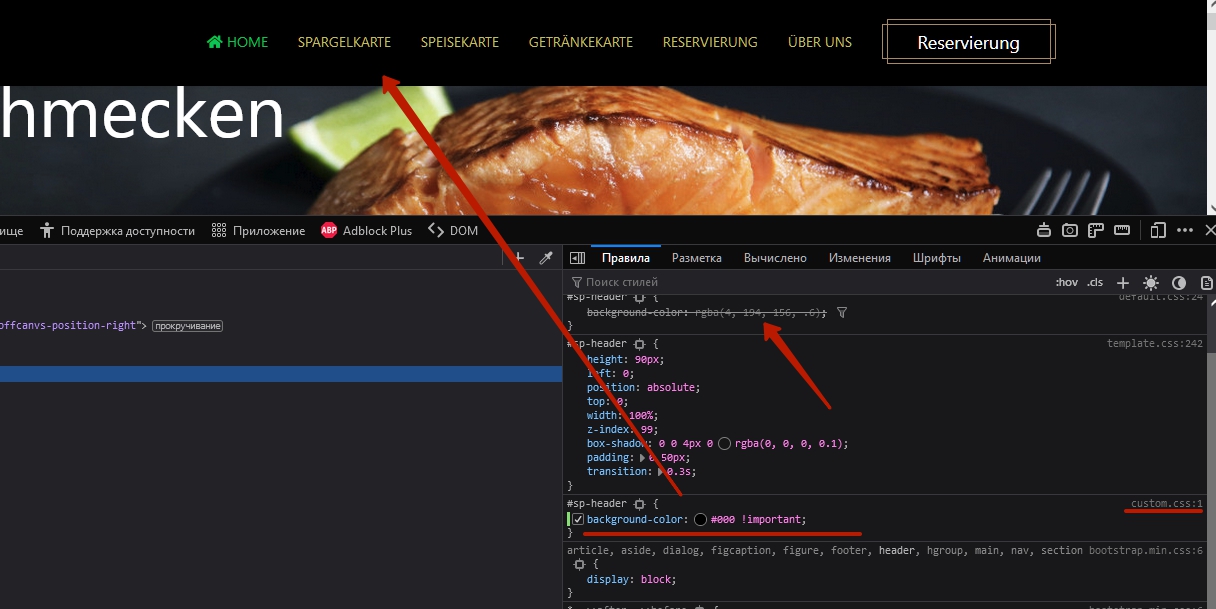
Toufiq
Accepted AnswerYes, Need to add !important. By the way we are working for the fix. Wait for the next release. Thanks
MT
Martin T.
Accepted AnswerYou made my custom.css empty. why? where is my Custom.css and where are my settings? Why are the colors changed. The colors were not included in the Custom.css

Kurt Wündsch
Accepted AnswerI have the exact same problem. After Update the cutom.css file where not loaded from the template. Before update is was the one standard option to override the Template. Please fix the Problem. Thanks a lot. Kurt
Kurt Wündsch
Accepted AnswerMy observation Sometimes when i load the custom.css over the Template System off Joomla, i also get a empty view. DON´T SAVE. The custom.css is fine in the backgrund, but when you save you override it.
I also have no fix for the problem yet. i always work directly via FTP
Toufiq
Accepted Answer@Kurt Wündsch Please provide me the Joomla administrator access to check the issue. Thanks
Kurt Wündsch
Accepted AnswerDear Toufiq!
When i find one of these Website at my clients with this custom.css Problem to open via Joomla Template System i send you information. Sorry, I have a lot of clients and in this minute no idea, which hat the problem.
For Info: I change no Adminstrator Access. It´s Joomla Standard Configuration.
MT
Martin T.
Accepted AnswerI have imported a backup. Thus, of course, the user created for you is no longer available. But I found the error during the update. It was due to the folder's authorization. I corrected this with Admin Tools. Thank you very much for your help.
Do you have any information when the problem with the custom.css will be fixed by update?