

SP LMS
A
angelo
I created a product with SP LMS here, LINK:
https://www.rules-chess-strategies.com/en/rules-chess-strategies-courses/3-scandinavian-defense
question1
How can I hide the bar : price:free Note: I'd like to sell this course via hikashop. Thus we're planning to add a hika button on the course article and access levels to the lessons.
qustion 2
I setted up free the course but I locked the lessons with access levels. Unfortunately the frond end provides the lessons as visible. In reality they are not. The problem here is that a student can click on the lessons but he will receive a 404 error.
The question is if I can "lock" the lessons (as in this course -> https://www.rules-chess-strategies.com/en/rules-chess-strategies-courses/4-grand-prix-attack)
A solution could be to lock the SP LMS product page (https://www.rules-chess-strategies.com/en/rules-chess-strategies-courses/3-scandinavian-defense) with access level, then to sell it with hika shop, LINK: https://www.rules-chess-strategies.com/en/all-course/product/127-scandinavian , and then giving a direct link the SP LMS product page. If you can suggest a better solution please advice.
Question 3 I have problems to seperate english and greek products. I prepared a menu "SP LMS » purchases" but it provide the english products to greek pages and vice versa. I'd like to shopw english products on english pages and respectively the same to greek pages.
Thanks in advance, Angelo
5 Answers
Order by
Oldest

Ofi Khan
Accepted Answer- This requires code customization and I have no idea on how to do this. Please consult a developer for this.
- Please check the blog I have shared and make sure that you have followed each steps for making multilingual site.
Ofi Khan
Accepted AnswerHello angelos
- Please use this CSS to Template Options -> Custom Code -> Custom CSS to hide the badge.
.splms-badge-free{ display: none; } - Courses need to under the same access level. In this way, you can do this. For example, without registration, the course cannot be viewed.
- Please follow this documentation and set the courses according to languages. Hopefully, it will be okay.
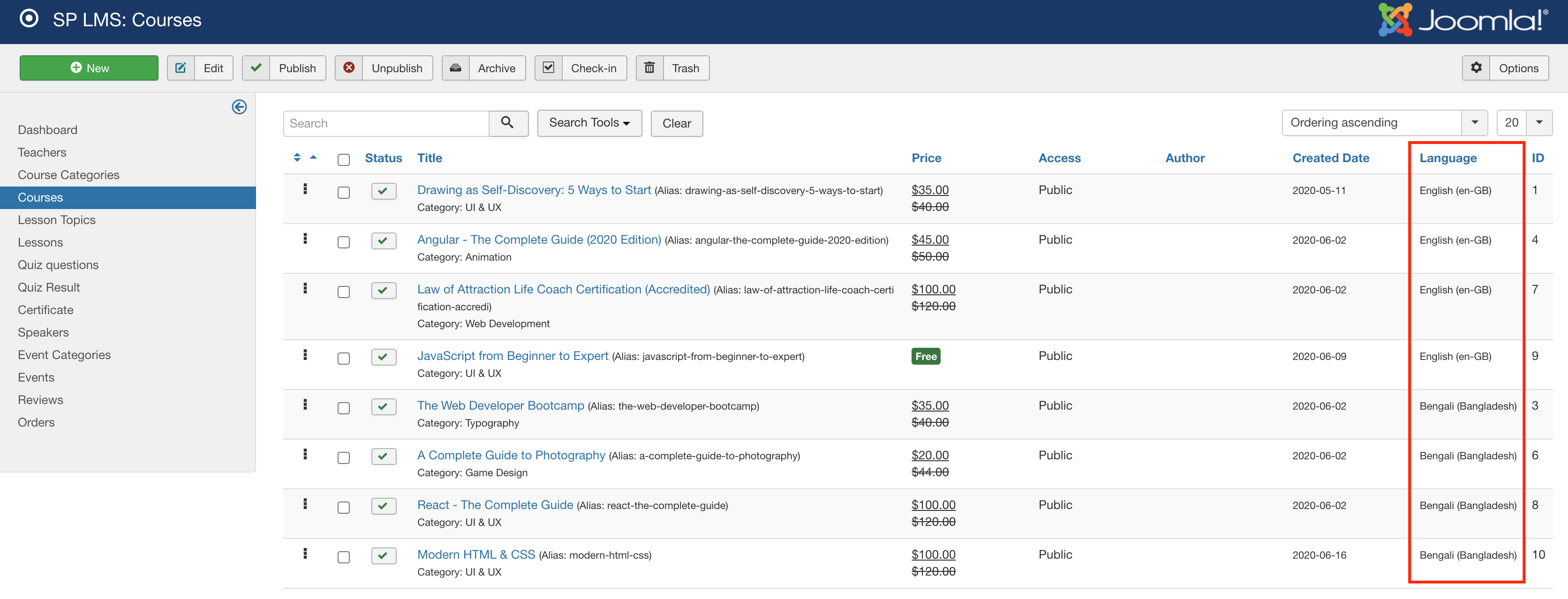
Best regards
A
angelo
Accepted AnswerThanks Ofi,
You're helping a lot!
-
Thank you.
-
This is a great problem! I'd like to sell the courses with Hikashop. I already added a different post regarding this and no one gives me a clear answer to this. You can read this post here: https://www.joomshaper.com/forum/question/5883
Note: could you please ask from Muntasir Sakib to give me more inforation. He never explained to me how to "Yes, you can link Hikashop in the button which will take your students to the desired page you have linked to."
- I did that as you can see in the attached image: https://imgur.com/a/OLhc3nP I didn't before ask the question but again I have the same problem, I cannot seperate languages.
Please advice