

Animated Nambers Doesnt Work
AU
Andrey Uvikov
Animated nambers doesnt work
video [https://youtu.be/TaATBTmHdLA]
24 Answers
Order by
Oldest

Anne
Accepted AnswerHello there
Thanks for contacting with us. Please share your administrator access here to check the issue. Use the Hidden Content box to share the credentials.
Best regards
Ł
Łukasz
Accepted AnswerHello, please provide a technical solution because I have the same problem.
Anne
Accepted AnswerHello there,
Please take my sincere apology for the unwanted delay. Please allow me some time. I am working on it,
-Regards
Anne
Accepted AnswerHello Andrey,
Please take my sincere apology for the unwanted delay. I have created a new page named test1 and import the entire row. It is completely fine on that page. And the animated number addon is working fine also. In the homepage, it has a conflict with your Raw HTML code. It conflicts with the first row and the tab addon in third row.
-Regards
Anne
Accepted AnswerHello Łukasz,
Would you mind to create a new forum post about the issue? Please share your administrator access there to check the issue. Use the Hidden Content box to share the credentials.
-Regards
AU
Andrey Uvikov
Accepted AnswerThis is not solution. Early it worked fine. There is only style on html addon. I turned off html addon and tab addon, but i have the same situation. I need keep main page without changing.
I am waiting support from you.
If cant I change animated numbers on regular font. But in this case i will disappointed by sppb. Update ruined my work
Anne
Accepted AnswerHello there
Please take my sincere apology. It was not a solution, I just wanted to inform you about the conflict. Would you mind to tell me from when you are facing this difficulty ? Did you update the Sp Page Builder ?I have attached a video in the hidden content for your understanding.
-Regards
AU
Andrey Uvikov
Accepted AnswerYou have mistaken. If you move number`s row below first screen You get the same problem even without first second and third rows

Ofi Khan
Accepted AnswerHello Andrey
Apology for the delay. It was a difficult issue and after full investigation, I can confirm that the issue is coming from Raw HTML addons. I have duplicated the page and checked each sections. Animated Number addon works fine for other pages. For example,
https://xn----7sbajp8bfqgr1a7g.xn--p1ai/component/sppagebuilder/?view=page&id=217
Here it works fine. The only issue happens with your homepage where many Raw HTML addons are there. If I disable all Raw HTML addon related sections, then it works fine. So, you need to check your Raw HTML codes. Remember that you can only use HTML inside the addons, no JavaScript or PHP or anything. Also, please review the codes in your Template Options -> Custom Code -> Before Head section. Unfortunately, your custom work is the reason for the issue and we cannot provide support for this. I hope you will understand this and fix your issue.
Best regards
AU
Andrey Uvikov
Accepted Answer
AU
Andrey Uvikov
Accepted AnswerI've been reporting a problem with your product for a month now. I show it on the video. And you send me the same answer. I can see for myself that the addon works, but only if it immediately hits the first screen. If it is not immediately visible, it does not work. I'm reproducing this moment on the page you created. I've done this before. Try it yourself. There is only this addon on this page and it does not work.
Ł
Łukasz
Accepted AnswerHello. The problem arose at the turn of some buggy update. I had the same. I rolled back an old copy and updated the components with the latest versions and the problem will be gone.
AU
Andrey Uvikov
Accepted AnswerBut Support think that all right. That`s why nothing will change. I have no old version of sppb pro. I dont want to solve this problem myself. I paid money and I want to get help from support. I have been waiting for a month and got nothing

Pavel
Accepted AnswerHi Ofi.
I confirm. There is a problem with an animation based on jQuery. This happens not only in Animated Nambers Addon, but also in other addons for example in Pie Progress Addon. To the animation starts, a shock action is required on the page. For example, press F12.
In this regard, I had to give up this and write my own code for animation.
works fine for other pages. For example, https://xn----7sbajp8bfqgr1a7g.xn--p1ai/component/sppagebuilder/?view=page&id=217
On this page the same.
Firefox - CTRL + F5 > scrolldown and look

Press F12 - works
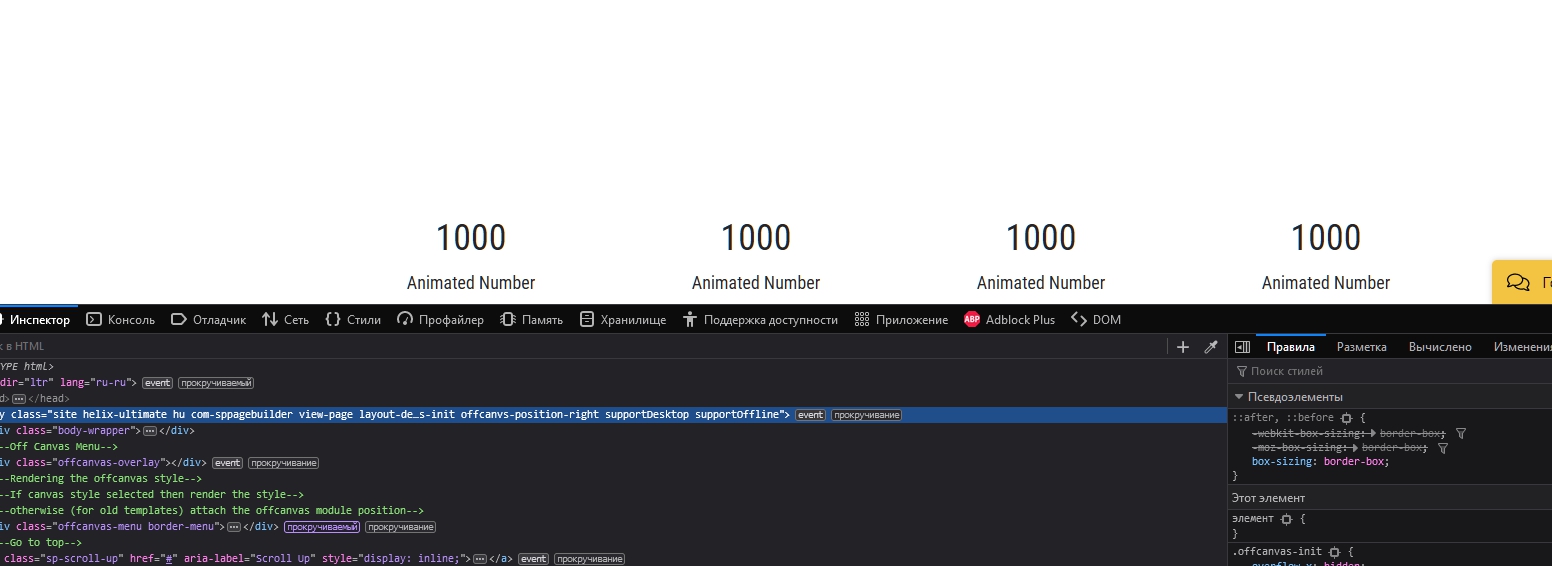
And yes, it happened after one of the recent updates.
It looks like a problem with a trigger for the start of the animation.
In general, a lot of bugs have accumulated in SP Page Builder, no one reports because they do not use these things. I'm just waiting for 4 version, in the hope that my bug list will not need.
Ofi Khan
Accepted AnswerThanks Pavel for looking into this matter. Interestlingly, I don't face this issue while checking on localhost. But yes, on Andrey's site, the issue is real. I will talk about it with the developers and let you know by the next week. Thank you guys for your patience and co-operation. We want to take care of the smallest glitch in SP Page Builder 4.
Pavel
Accepted AnswerHi Ofi. Other problems with jQuery are observed in Helix Ultimate 2. Perhaps this is the whole consequence of the same problem. https://www.joomshaper.com/forum/question/8530
Ofi Khan
Accepted AnswerHello Andrey,
I need some more information. Have you used any plugin for optimization like JCH?
Ofi Khan
Accepted AnswerPlease go to this location: components/com_sppagebuilder/assets/js and replace sppagebuilder.js file with the attached file. You need to unzip the file and then replace.
Hopefully, it will solve your issue.