Hi, i am using onepage template and Offcanvas menu is always expanded
https://ourgoal.eu/en/
How can i fix it?
Thanks in advance
Hi, i am using onepage template and Offcanvas menu is always expanded
https://ourgoal.eu/en/
How can i fix it?
Thanks in advance
Hi,
Its seema ok on my end could you please clear your browser cache and check again?
-Regards
Thanks for your quick response,
but still the same problem after clearing browser and template cache.
Thanks
Hi,
Give me any screencast of your issue it seems ok on my end
1.Structure is a sub-menu of nZEBs, also 2.-10.Collaborations.
it should be collapsed under nZEBs and when i press an arrow or a plus symbol to be expand.
The sub menu ia already expanded.
Thans again.

Give me your super admin access on the hidden content please I need to check
i have provide you the credentials.
thanks
Could you please keep a backup and make this off canvas again?
Hi, i have just make a full backup
Is anything else that i can do in order to fix it?
Thanks
Now create again this offcanvas and try again
Can you Help me on how i will do that?
Thanks again
Hi,
You have used onepage template right? This is the deafult settings of onepage template. Please follow our demo and also my screenshot below:
https://demo.joomshaper.com/2014/onepage/
Thanks
I have try to recreate the offcanvas and same thing.
I noticed that this also happen to your demo site, the blog menu is expanded.
Is there any option to the submenu to be collapsed and have a plus symbol or an arrow and when i click it expand the submenu?
Thanks again
Hi,
Yes, it is also on our demo site. Sorry, there is no way as it's a default setting. You can customize it but you have to do it by yourself as we do not provide customization support
Hi Tom, Hi Mehtaz.
It's a default setting, OK. We have to customize it by ourselves, OK.
But where is the file with those presets we have to customize in SP Page Builder ?
Hi
You can follow this for template ovverrides
https://www.joomshaper.com/documentation/helix-framework/helix-ultimate-2/template-views-override
Hi,
this link is for override article, module or a component.
How can i hide sub menu items and appear after clicking the basic menu or a plus (+) symbol.
thanks again.
As I said you have to customize it. You can follow our others template
Hi, i think th file that i need to customize is templates/shaper_onepage/html/mod_menu/default.php is that right?
Which line do i need to change and what code to write?
Also i just notice that greek off canvas menu is repeated twice.
Thanks
Hello Tom
You are right. You need to customize the file and also css/template.css and js/main.js. They are all linked together. Sorry, we do not provide customization support. Hence no more support on this issue.
Tip: You can take a different menu for offcanvas without the dropdown menu items. Then only parent menus will be shown on the offcanvas. It is an alternative option to hide child items.
Best regards
ok, i will try that.
i have noticed that in greek off canvas menu, menu appear 2 times, any ideas why is that happenig?
Thanks
Two offcanvas menu module was published for Greek language. I have unpublished one. Greek language offcanvas is okay now.
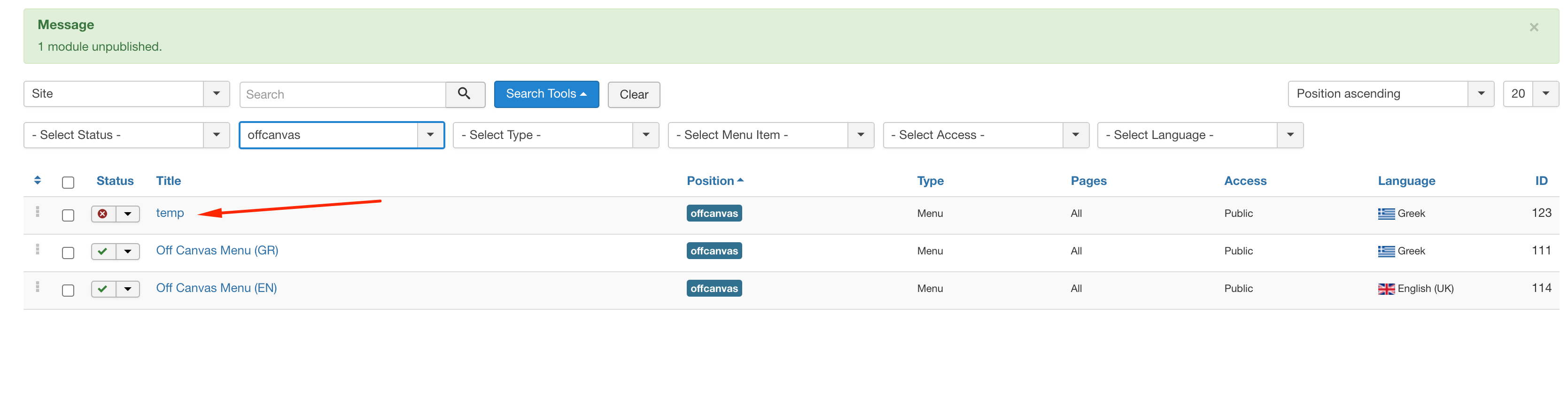
I didn't remember that at all.
Thanks for all your help
No problem. You are welcome.

