

Helix Ultimate Space

Daniel Jubelt
I want to use Helix Ultimate and have a few weeks work invested in it. My boss wants me to go to another framework for one reason. The space between header and content, the space between sub-menu items. I have tried all of your recommended fixes and one of them work. After changing the CSS, it's ok until I close the browser then it goes back to the way it was. I'm asking for assistance one more time before taking it off the machine. Please.
4 Answers
Order by
Oldest

Rashida Rahman
Accepted AnswerHi there!
Thanks for your query.
Would you please give me your site URL here to check where the gap is? Kindly, redirect me to those issues with screenshots for better understanding.
Where did you put your custom CSS?
Note: Path towards custom CSS: Extensions>Templates>Styles> Click on your current default template name then choose Template Options. Then find custom CSS within the custom code.
Best Regards
Daniel Jubelt
Accepted AnswerHi "Would you please give me your site URL here to check where the gap is? Kindly, redirect me to those issues with screenshots for better understanding."
https://new.uniteduga.com/index.php Just look at the first page or about us. It's obvious! No one would design a site like this. I've already started removing most pages. I edited the file; {site}/templates/shaper_helixultimate/css/template css I changes : #sp-main-body{padding:100px 0} to #sp-main-body{padding:0px 0} These were your tech' sinstructions on google. I do not know how to write CSS. Except for these two space problems, helix ultimate is great.
The pages of our own HelixUltimate preview are completely inconsistant. Some have space, some have no space and some have some space. We need consistancy!

Pavel
Accepted AnswerHi. It is your custom error. The article has an empty p tag, which causes the problem.
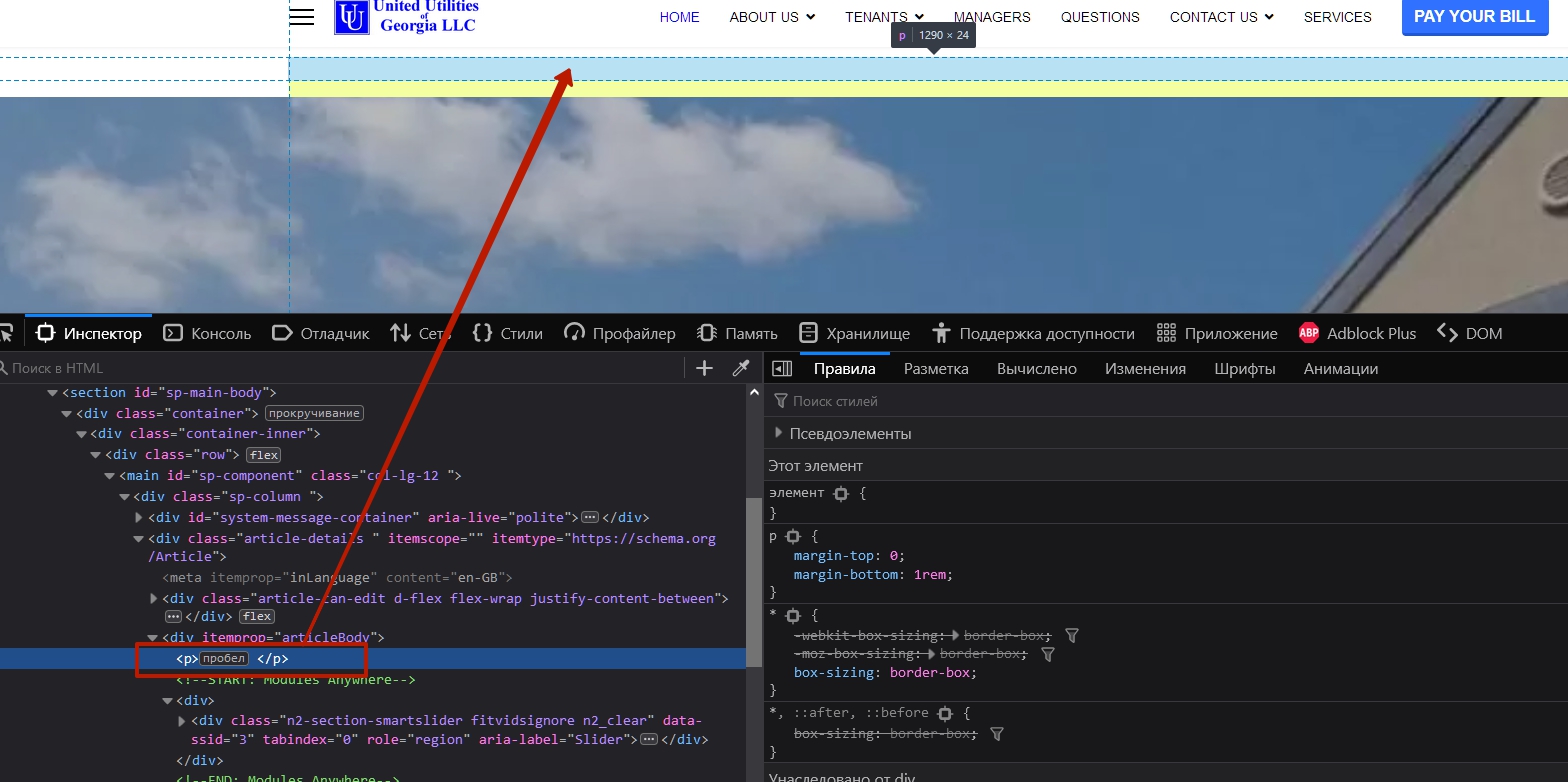
Editing template.css is also an error. All changes will be lost after updating the template. You need to study the Helix documentation about how to use custom css code and raise your webmaster skills, otherwise such problems will occur with any template, and not just with Helix.
Rashida Rahman
Accepted AnswerHi Jubelt,
Yes, as Pavel says, it is not recommended to touch the template.css file, please use the custom CSS field of the Template or create a custom.css file inside.
Here is the related documentation link: https://www.joomshaper.com/documentation/helix-framework/helix-ultimate-2/custom-code-css-js-meta
Note: Path towards custom CSS: Extensions>Templates>Styles> Click on your current default template name then choose Template Options. Then find custom CSS within the custom code.
Best Regards