

Setings For Tablet have No Effect
J
jakob.beyeler
Hi, I have discovered a bug. The setings for tablets have no effect. I have tried it in the section setings, the addons, heading, image layout setings, without any effect, as you can see on the screencast. Link in the hidden content.
Thank you.
Tested with, Chrome, Opera, Edge, Firefox. Same on all 4 browsers
Wamp64 Joomla 3.10.3 SPPB 3.8.0 Appache 2.4.46 PHP 7.4.9 MySql 5.7.31
11 Answers
Order by
Oldest

Paul Frankowski
Accepted AnswerYour Galaxy Tab S2 has resolution of 1536x2048 pixels which is simlar to small laptop. So I guess, in that case you have to use extra custom CSS. Default SPPB setting do not help.

Toufiq
Accepted AnswerHi there,
Thanks for contacting us. Sorry for the inconvenience. Will you please provide me the Joomla administrator access to check the issue? I will check & get back to you soon.
-Thanks
J
jakob.beyeler
Accepted AnswerHi Toufiq i have put the testsite online, so you can acces it. The acces link an credentials are in the hidden Content.
Look at the German language pages. It is the only pages i changed for now.
Paul Frankowski
Accepted AnswerHi,
If I may.... how you tested "Tablet" view? As we all know there are different tablets with a different resolution, not only iPads are on the market. Besides even iPad screen have two/three sizes.
Let talk about tablet resolution - what is your goal - 780px, 820px, 860px, 980px, 1024px ?
J
jakob.beyeler
Accepted AnswerHi Paul, i have tested it now. On the tablet it looks not bad. But i would change the font sizes for the tablet in the frontend editor. Wenn for example, in the Heading Addon i click the the tablet icon to change the font size, i can imput any value i want, the font size don't change in the editor view. Wenn i choose desktop or mobile i can see the changes live on the editort view. you can try it. It is allmost in every Addon like this. Even when you want to change the section settings. You can see on the screencast what i mean.
BTW: i see that the offcanva menu don't show the submenus. I use the helix ultimate 2.0.5 . Ok, i fund the solution, it was my mistake. I forgot to enable the submenus on offcanva menu.
Paul Frankowski
Accepted AnswerJokob, as you noticed Font Size can be changed there are 3 icons (Desktop, Tablet, Mobile) but ....
there are different resolutions of screen in tablet and in SPPB there is set for one higher and all below.
I will repeat my question: On what resolution we are talking about??
If you don't know, just tell us Tablet model.
Toufiq
Accepted AnswerTried to login your administrator access. But, Administrator url doesn't work.
Paul Frankowski
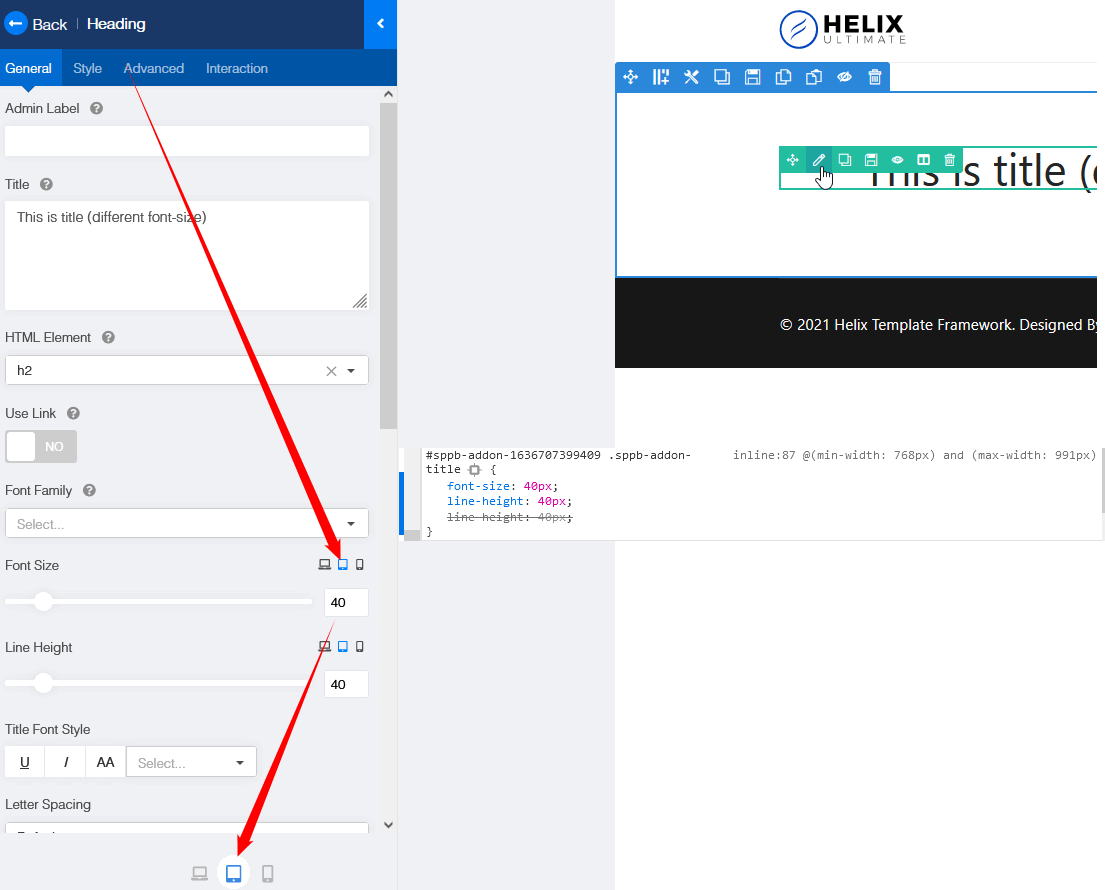
Accepted AnswerTablet view (switcher) works for screen size between 768px and 991px , it means iPad Air, iPad Mini etc.
evidence
J
jakob.beyeler
Accepted Answer@Toufiq, sorry, there is indeed a problem, i can't acces my self to the page. Will have a look after work this evening and come back to you later when it works again. Thank you for now.
@Paul, i have this Samsung Galaxy Tab S2 T810N 24,6 cm (9.7 Zoll)