I get the following error when i try to access the above mentioned pages.
Errormessage in hidden area
What can i do?
I updated to the last version,
i cleaned Joomla Cache and Browser Cache.
Website itself works fine.
Staff replied
SP Page Builder
Error when trying access PAGES-Editor or MAINTENANCE PAge
35 replies
Mirko Guttzeit Asked this
Actually it seems not to be that the page is not accessible, there are just a Lot Errors with undefinded property:stdClass::$table_name
I tried to make an Update of the sppagebuilder Database but it only says "Maintenance in progress please wait" but nothing happens...
Can you please help me?

Toufiq Senior Staff
Hi there,
Thanks for contacting us. Sorry for the inconvenience. Will you please provide me the Joomla administrator access & FTP access to check the issue? I will check & get back to you soon.
-Thanks
Mirko Guttzeit Asked this
5 years ago
· edited
Hi Toufiq,
i was able to get rid of the errormessage. The only thing i still have is, that system keeps telling me it has to make a Database Update, even when it was done over the maintenance page.
Today it is again that the update does not work.

Paul Frankowski Senior Staff
- What PHP version you have? We support only PHP 7.x line.
- What MySQL version you have?
Toufiq Senior Staff
Will you please provide me the Joomla administrator access & FTP access to check the issue? I will check & get back to you soon.
Mirko Guttzeit Asked this
Accessdetails in Hidden content
Paul Frankowski Senior Staff
Thanks, login is correct.
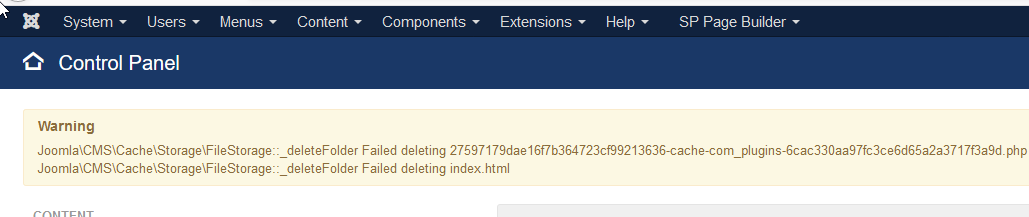
But I noticed that Your Joomla has a problem with cache plugin.
Paul Frankowski Senior Staff
5 years ago
· edited
-
Please set role as Super Administartor - otherwise we cannot check many areas!
-
I will ask again: what MySQL version do you have? I guess v8. That's why all problems.
Mirko Guttzeit Asked this
Role is set!
Webspace uses PHP 7.4, i do not know which mysql Version is used.
Mirko Guttzeit Asked this
Was already something changed? I cannot delete Cache anymore.
Toufiq Senior Staff
Please use the PHP version 7.3 and mysql version 5 instead of 8. Thanks
Paul Frankowski Senior Staff
Was already something changed? I cannot delete Cache anymore.
Not me. After login I noticed that error which I presented in screenshot. I couldn't disable anything being only administrator.
Paul Frankowski Senior Staff
5 years ago
· edited
Danke fur Super User.
In general you have big problems with folders permissions.
System - System Information - Folder Permissions - all is red!
Please fix it, it's Joomla core area!. Let us know after.
Mirko Guttzeit Asked this
Where do the permission problems come from? Yesterday evening i had no problems. And did not change anything on permissions.
Paul Frankowski Senior Staff
forum.joomla.org
Sorry, but we are not Joomla support.
Probably your hosting provider done something, if you didn't touch anything in cPanel.
Mirko Guttzeit Asked this
Next thing is i cannot change MySQL Version. Something else i can do?
Paul Frankowski Senior Staff
Don't worry, we have testing version of SPPB for MySQL v8, we will install you after you fix folder permission problem.
Mirko Guttzeit Asked this
Folder Permissions are solved!
Paul Frankowski Senior Staff
Please use FTP tool
and rename folder from:
administrator\components\old_com_sppagebuilder
to
administrator\components\com_sppagebuilder
and let me know!
Mirko Guttzeit Asked this
Done!
Paul Frankowski Senior Staff
Can you upload this file to root folder:
https://www.joomshaper.com/media/helpdesk/attachments/f5adc7463a80ac5761e877b5e72d0a2e/maintenannce.zip
Mirko Guttzeit Asked this
Done!
Mirko Guttzeit Asked this
Does FTP not work?
Mirko Guttzeit Asked this
.
Paul Frankowski Senior Staff
Not really. Are you sure that it's correct server name.
Mirko Guttzeit Asked this
.
Paul Frankowski Senior Staff
But I am trying to do all I can using extra installed Joomla extensions only.
Using tips from: https://www.joomshaper.com/forum/question/7
Mirko Guttzeit Asked this
I already set the ID from the mentioned tables in Question 7 to auto increment. just for Info
Paul Frankowski Senior Staff
I stuck with database edition, your server doesn't allows me from Joomla folder.
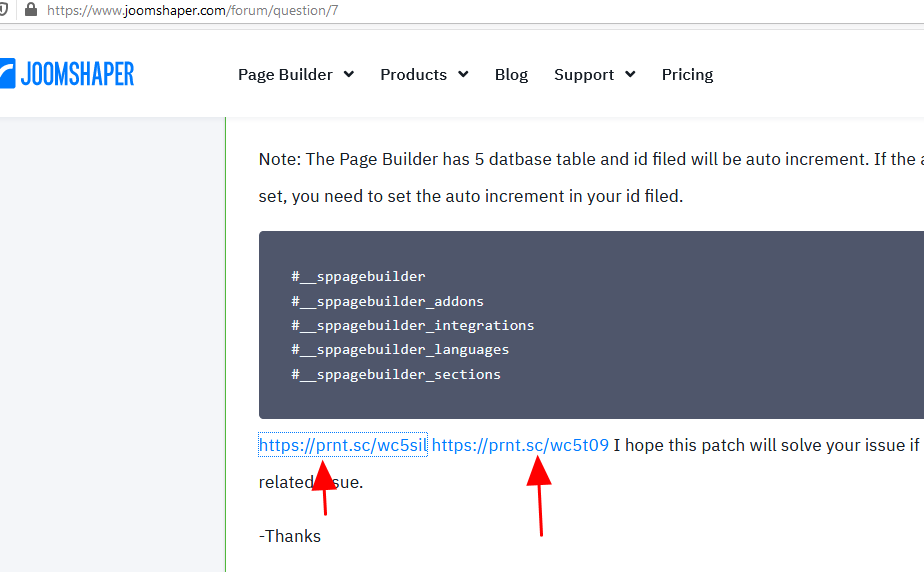
Can you
use your PhpMyAdmin from cPanel and do this:
Paul Frankowski Senior Staff
Can you share us access to database editor MySQL. It would be faster to fix it.
Mirko Guttzeit Asked this
I alreday did this, but maybe you can access via this link:
Mirko Guttzeit Asked this
Hi Paul, hi Toufiq,
can provide a Status? Were you able to fix it? Do you need something from me?
Thx in advance
Mirko
Toufiq Senior Staff
@Mirko Guttzeit please check & let me know. Thanks
Mirko Guttzeit Asked this
Seems to work fine!
Thanks for your support!
I appreciate your work!
Toufiq Senior Staff
@Mirko Guttzeit you are most welcome & Thanks
Log in to reply.