Hallo.
After installing the Helix Update 2.1.3, I'm experiencing a display error in the navigation. The logo, which is located centrally between the links and has a home link, is now displayed in a different location behind the navigation. Why is this?
Staff replied
Helix Framework
Helix Update 2.1.3
8 replies

Mehtaz Afsana Borsha Staff
Hi
Thanks for contacting us and sorry for your issue. Could you please give me your site URL and also a screenshot of your issue?
-Regards.
Lars Preussner Asked this
Mehtaz Afsana Borsha Staff
You can use this for uploading screenshot.
Lars Preussner Asked this
Mehtaz Afsana Borsha Staff
Go to Template Options > Advanced Tab and ensure "Compile SCSS to CSS" is set to "ON." Then clear your Joomla and Browser cache and check.
Lars Preussner Asked this
Thanks for the tip, but it didn't help.

Paul Frankowski Senior Staff
1 year ago
· edited
It looks that in that "new-updated" site, there is missing empty menu item with class name "logo-center" as it was on the orginal site.
I also noticed (more important) thing, that your template does not belong to Us, "Towy" was bought somewhere else...
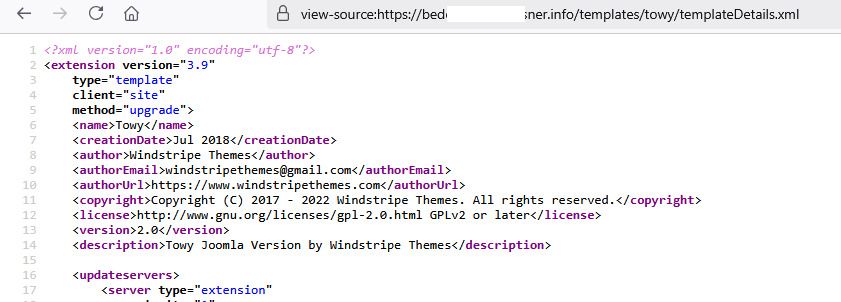
According to Support Policy 8.8. - I have to ask you to contact with Template Developer (Author). They should have ready fix for that.
Mehtaz Afsana Borsha Staff
Hi
Is this solved now?
Log in to reply.