Hello, I have installed the Indigo template and this message appears (I am sending a screenshot). Could you please check what the problem is?
Staff replied
Templates
Error installing template
8 replies

Paul Frankowski Senior Staff
Hola Sergio,
fixed, you forgot to enable Behaviour - Backward Compatibility 6 plugin.
Paul Frankowski Senior Staff
BTW
In that Template menu is short, and divided into two columns, so make it look good, you have to change menu structure. Left and Right Menu should have less main menu items. For each side you may have max 3 menu items (!)
Sergio Caro Morilla Asked this
Hi Pablo, how are you?
How can I assign the menus on the right side? I've never done this before. Can you help me?
Thank you very much.
Sergio Caro Morilla Asked this
I don't know why it keeps picking up the helix style, and I also get this message when I enter the style: Missing webfonts.json file. Please go to advanced > Font Settings and add Google Font Api and update.
Paul Frankowski Senior Staff
Great. But still cold Winter here.
Give me a moment, and I will show you how this works.
Sergio Caro Morilla Asked this
okay, thank you
Paul Frankowski Senior Staff
Look below
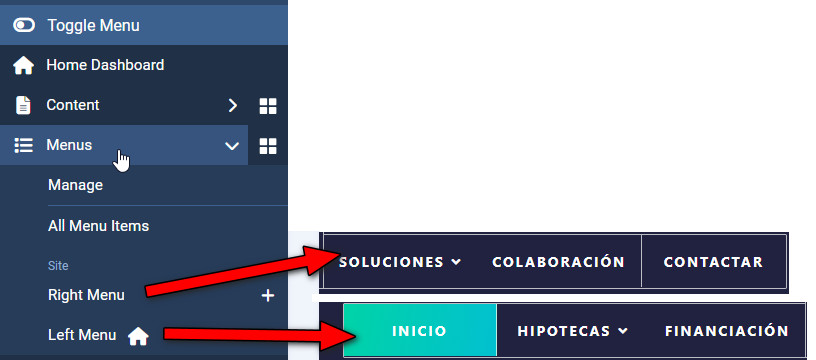
You can manage menu items from those two menus. I also set right menu inside Template Options.
Sergio Caro Morilla Asked this
One last question: in order to have this menu, do I need to install the Joomla Quickstart Pack?
Paul Frankowski Senior Staff
In theory yes, but on test subdomain, only to import-export template style. Later you can delete it.
Sorry, I don't have that QS installed anymore, to export settings.
Log in to reply.