Layout - Module Positions
Joomla 4, 5, 6
Updated 4 Oct 2018
1 min read
The following screen-shot highlights the default layout module positions that we used in current template. By using Layout builder in Helix3 users will be able to move positions or change their size in the grid. Our in-build layout builder from template settings provide the opportunity to add new positions, columns, rows wherever you need as much as moving elements.
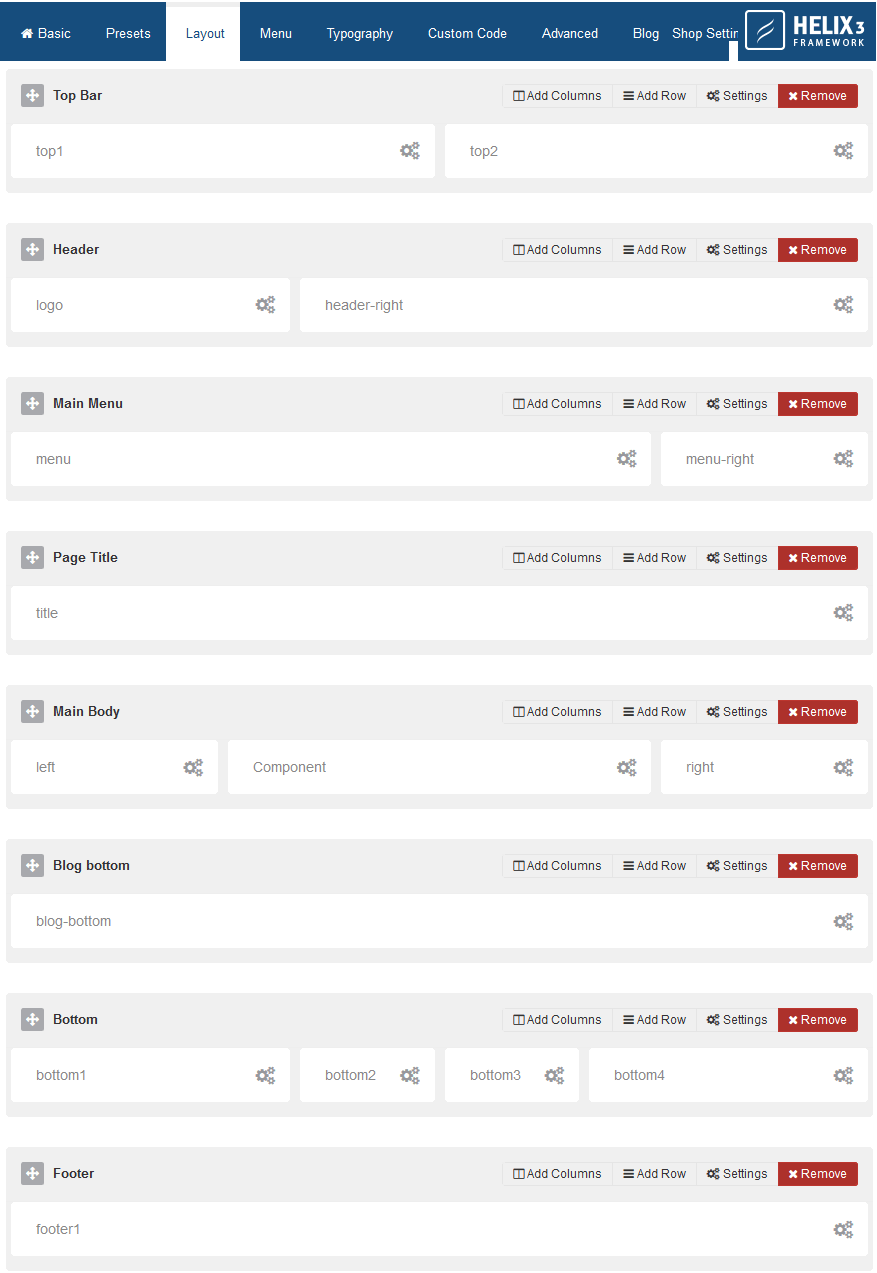
These are the all available template module positions which you can use:
- title
- top1
- top2
- top3
- logo
- menu
- menu-right
- menu-module
- header-right
- component-right
- blog-bottom
- search
- slide
- user1
- user2
- user3
- user4
- left
- right
- feature
- slider
- position1
- position2
- position3
- position4
- position5
- position6
- position7
- position8
- bottom1
- bottom2
- bottom3
- bottom4
- breadcrumb
- footer1
- footer2
- comingsoon
- offcanvas
- pagebuilder
- 404
- debug
It means that you can use all of them on layout grid.But first you have to add new block and choose those position names. If you need more or more unique names, you have to add new name inside: templates\shaper_news365\templateDetails.xml