

Hope Template : Changing A Page Picture
CL
caroline lemoine
Hello, I tried to change the picture of an article already written with the quickstart files (a grey rectangle with the size written on it). I indicated a photo for the full article image and the intro image, in article > edit, but it's always the grey rectangle we see. Where do I have to indicate the files for this picture ? Thanks for your help
4 Answers
Order by
Oldest

Paul Frankowski
Accepted AnswerHi Caroline,
If we talk about Image inside article with label 1170x650 it should be deleted and replaced by new one from "Blog Options" tab
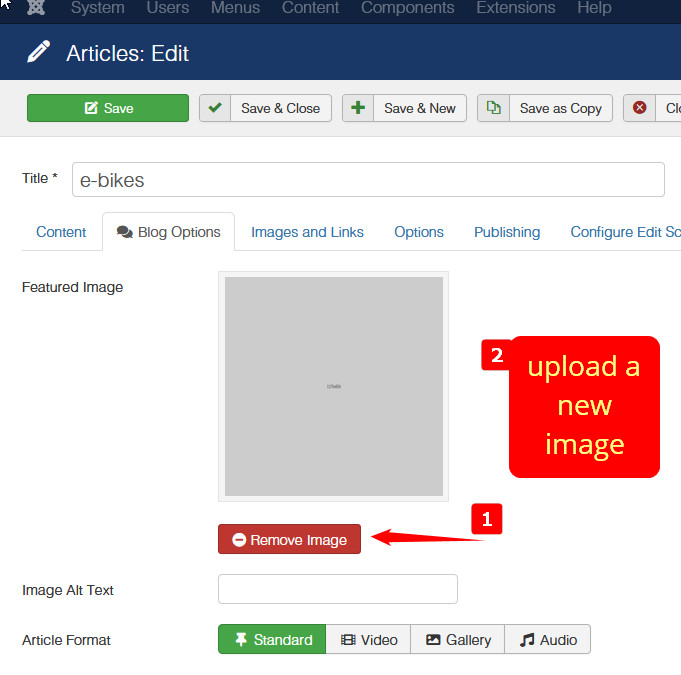
Advice: In general it's better to create your own NEW articles and delete old demo ones.
Paul Frankowski
Accepted AnswerAbout image used in the header (below menu and logo) - you can use FTP tool and replace that image with custom one
/images/demo/page-title-bg.jpg
try to use similar resolution 1920 x 425px and jpg type (!)
CL
caroline lemoine
Accepted AnswerHi Paul,
I tried with a new article and everything is fine. I know it's better to create now pages, but modifying existing pages is helpfull to better understand how it works ;-)