

Template Webfonts.json

Kevin Salbrechter
Hello, I have a problem with the webfonts.json file. How can I solve this? The help in the forum did not bring anything! Also, I can't change colors. I have this problem with all templates except Helix. I can't change the template layout. Neither color nor font nor alignment.
Website
https://technika.tech
4 Answers
Order by
Oldest

Paul Frankowski
Accepted AnswerHi Kevin,
but what is a problem with webfonts.json - is that file is missing somehow ?
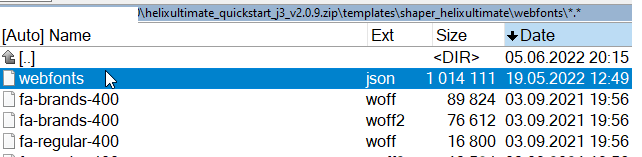
If yes, just download Helix ultimate quickstart and copy using FTP tool missing file and folder. This font collection is very fresh.
Paul Frankowski
Accepted AnswerI can't change the template layout.
Choose:
- You cannot add new rows and set columns?
- You cannot change header layout?
- Or your changes are not saved?
Or you read Helix documenation (links below) but you are still lost?
https://www.joomshaper.com/documentation/helix-framework/helix-ultimate-2/layout-builder
or
https://www.joomshaper.com/documentation/helix-framework/helix-ultimate-2/custom-header
Kevin Salbrechter
Accepted AnswerHello Paul
I tried as you described. Unfortunately nothing worked.
I can't make any layout settings. Color, Menu, Header. Everything you can do with Helix Ultimate is not possible here.
Paul Frankowski
Accepted AnswerKevin
Here is above guide but version for dummies:
- Download Helix Ultimate Quickstart package
- Unzip on your laptop
- Use FTP tool, connect with server and and inside folder templates/shaper_salon/ CREATE a NEW folder "webfonts"
- Upload there a file "webfonts.json" from your laptop
It will fix missing file problem.