

Template Settings
YS
YUMA SCOTT
I'm using Shaper Restora and I'm looking for help on a couple of more items. One, when offline, there is a front end login, it is customized. How do I edit the content and background? This is not the admin login, see here: https://prnt.sc/EFAtIycb4gxv
Next, I have a the off canvas menu displayed in mobile, but it's not showing the lower level menu items. See below: https://prnt.sc/ZwAdS7mG5S-P https://prnt.sc/rvTRUg4RzOO3 https://prnt.sc/fah7V4fat-Ni
Also, how do I customize this spacing for the mobile menu: https://prnt.sc/V0WCFFA45vWd
Thank you!
14 Answers
Order by
Oldest

Paul Frankowski
Accepted AnswerHi Scott,
- For deeper customization you can edit that file: templates\shaper_restora\offline.php To change only image you can use Template Options, as I remember this same image is used for COmming soon and offline mode. But you can override by using that CSS class and background inside
html.offline body { }
But There is also smart way! Just create a custom Page using SP Page Builder and set it as default home page and make all other menu items visible only for Super User.
Paul Frankowski
Accepted Answer- "Companies" what menu type it's ?
- Sorry I don't understand. Do you want to move [=] to the right side? If yes, it's already, but you are logged as Super User that's why you see "Edit page" button.
YS
YUMA SCOTT
Accepted AnswerHello Paul, Thanks for the reply. My first name is Yuma by the way. 1: I was able to upload an image to replace the coming soon, but I don't see a way to do it in the template settings. How do I update/edit the text that is shown on the login page? Creating a custom default page will override the login template? 2. "Companies" is a set up as a menu heading, then other menu items have it as the parent. 3. Yes, I want that menu on the right side. I'll have to check into the edit page.
I will include super user info. Thanks again for your help!
Paul Frankowski
Accepted AnswerCreating a custom default page will override the login template?
No it will not, It's just alternative method if you don't want to use custom CSS nor edit php file which I mentioned.
Paul Frankowski
Accepted AnswerYes, I want that menu on the right side
You have already (I made small change), if you will not be logged on front-end, the [=] icon from the Mobile Menu will be on the right side. Evidence
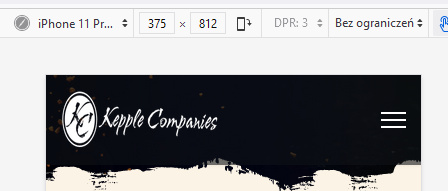
So all guest users will see that way. Yuma, I promise.
YS
YUMA SCOTT
Accepted AnswerAwesome, thanks Paul! Can you take a look at this help ticket if/when you have time? https://www.joomshaper.com/forum/question/16797#qa-answer-80615
Paul Frankowski
Accepted Answer"Companies" is a set up as a menu heading
It was wrong choice. You should use "System Links > URL > with link #" I changed already and now is OK.
Evidence how it works now.
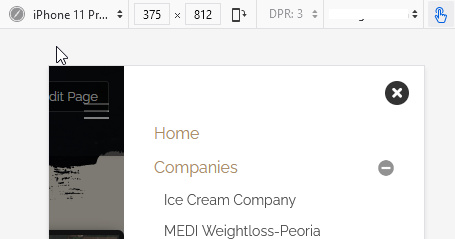
Or just use Page if you don't want to have blank menu item.
YS
YUMA SCOTT
Accepted AnswerAlso, were you able to see the companies menu not working in mobile? -Disregard Thank you!
Paul Frankowski
Accepted AnswerWith access to admin, all was simple. Thanks and Enjoy your time with Joomla.
YS
YUMA SCOTT
Accepted AnswerPaul, Hopefully you'll see this again. I've looked at the offline.php and do not see anywhere that allows me to change the text content. see screenshot below, I don't see where I can edit this: https://prnt.sc/TEHvXPYO62Yg
Paul Frankowski
Accepted AnswerIf you wanted to change only text, in that case
In Template Options > Basic > Comming Soon > Text field with "Hello, dear food lovers! How are you?"
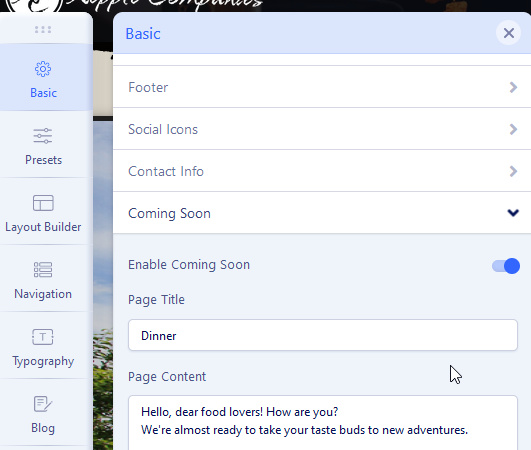
Comming soon is not typical offline mode, two different options, first is from template and second from Joomla settings - that's why you mixed my mind ;p
Using Offline mode - is better, because you can still login and edit/preview site.
Coming Soon - is mostly when you do not work on your site and you wait for premiere day.
YS
YUMA SCOTT
Accepted AnswerThanks for the reply Paul but that is where I am confused because as you can see here that option is not even turned on so how is it populating text? https://prnt.sc/ondIyj4rESRF
I don't see a way to edit offline mode text except for in the control panel but this is not the text that is showing.