Solved Templates

No Google Font

Asked by eierkopf 4 years ago Last activity 4 years ago

Hi,
I have disabled 'Google Fonts' in both the SPPB and the helix-ultimate template.
Nevertheless, the page source code

<link rel="stylesheet" type="text/css" href="https://fonts.googleapis.com/css?display=swap&amp;family=Montserrat%3A300%2C400%7CRaleway%3A300%2C400" media="all">

This is not allowed in Germany. Where in the code do I disable this call?

Thank you for your help.

Accepted answer

Marked as the solution
eierkopf Asked this
4 years ago · edited

Nach "manueller" Suche mit phpMyAdmin in der DB habe ich den Verursacher gefunden: beim Smart Slider müssen die Google Fonts deaktiviert werden.

5 more replies

Paul Frankowski Senior Staff
4 years ago · edited

Hi,

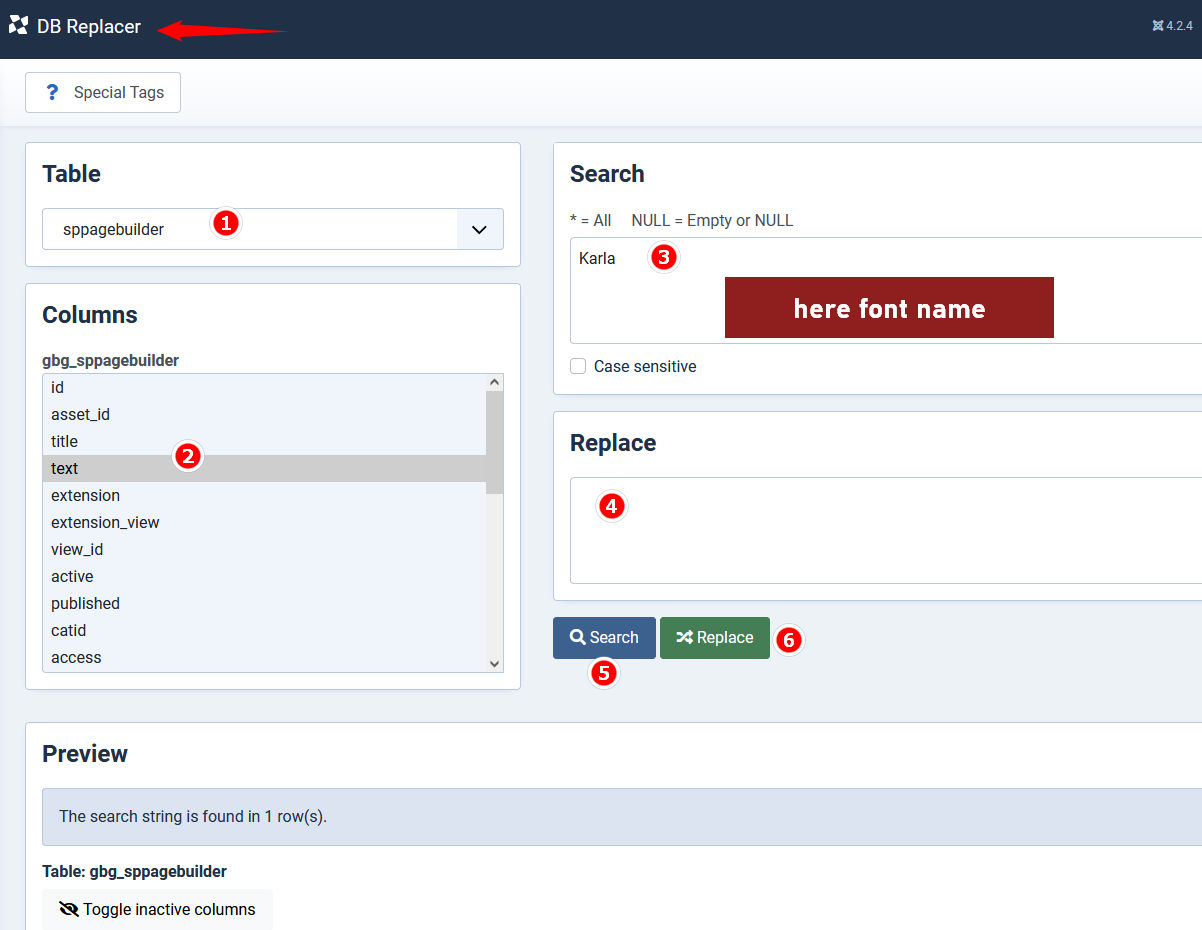
use DB Replacer extension (free) to find and remove Google Font in 60sec.

google_fonts_remove.jpg

in your case you have to search separetly those names:

  • Montserrat
  • Raleway
eierkopf Asked this

Hello Paul,
I installed DB Replacer. For both search terms I get the message that they were not found. I can't put a picture here to prove it.

eierkopf Asked this
4 years ago · edited

Hallo Thomas,
ich kenne das Video und stimme dir zu, dass es sehr hilfreich ist.
Leider kann ich mit meiner Seite erst online gehen, wenn ich den Serveraufruf aus dem Quellcode entfernen kann. Und dabei benötige ich Hilfe.

Paul Frankowski Senior Staff

About Slideshow addon it will be fixed in next update.

About Smart Slider .... is that our extension?? If not, I cannot help.

Log in to reply.