Black Friday 2026 50% off every plan Our biggest deal of the year on #1 Joomla products.
Ends in 12d 19h 17m 24s
Claim 50% off
Staff replied SP Page Builder

Error trying to index pages for Smart Search

Asked by Nicolò 1 year ago Last activity 1 year ago

Hi,
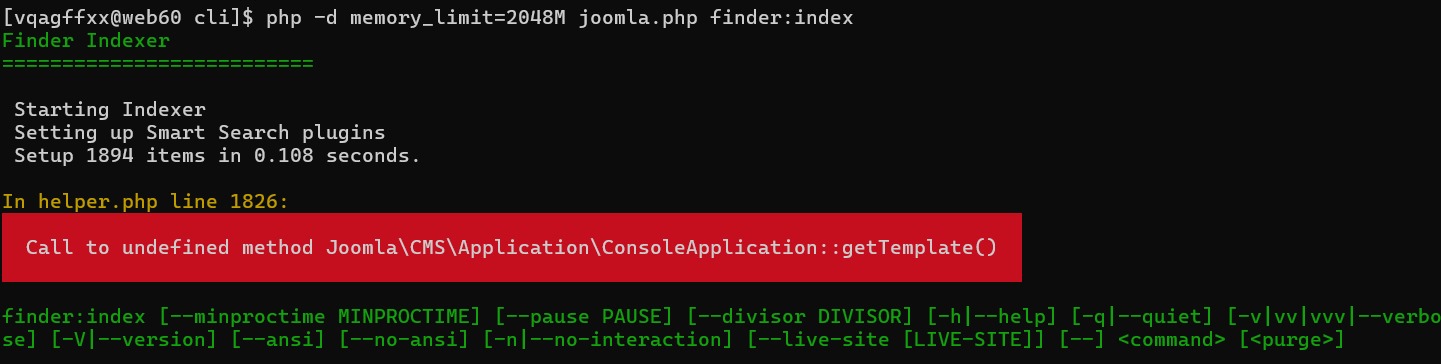
I've made a command to execute the smart search indexing via Cronjob. When I run this string via SSH
"php /myserverroot/cli/joomla.php finder:index", it doesn't work due to this error:

Finder Indexer

Starting Indexer
Setting up Smart Search plugins
Setup 1850 items in 0.152 seconds.

In image.php line 61:

Call to undefined method Joomla\CMS\Application\ConsoleApplication::getTemplate()

Thank you

7 replies

Ofi Khan Staff

Hello Nicolò,

Thank you for reaching out to our technical support forum. I’m sorry to hear about the trouble you’re experiencing. Rest assured, I will look into this issue for you and work to resolve it as quickly as possible.

If you could kindly provide any additional information regarding the issue, it would greatly help me investigate and address it more efficiently. Please share a screenshot of your issue to understand it better. Take a screenshot and share via any platform. For example: Lightshot or Imgur

Best regards

Nicolò Asked this

Hi, yes of course you can find the screenshot image attached.image

Ofi Khan Staff

I am not familiar with Cronjob. Can you help me understand it? How the error affects your site? Let me know if your Joomla site faces any issue with the plugin.

Nicolò Asked this

Cronjob are simple bash command that will be run every specific time.

The problem is with the bash command, joomshaper is giving the error that i linked before when i try to refresh the joomla smart index.

I have to understand why it's blocking the execution of the command.

Thanks in advance.

Ofi Khan Staff

I need more information. I have checked the latest Joomla version. No problem is found on indexing through CLI. Please check your index option from cli again. I am suspecting that the issue is not with the SP Page Builder. You can disable SP Page Builder and check if the issue occurs .

Ofi Khan Staff

Just checking in to see if you have feedback on the provided solution. If the answer resolved your query, you can mark it as accepted to close the post and guide others with similar questions. You’ll find a button to accept answers below each comment.

If you need further assistance, feel free to let us know!

Log in to reply.