

Blog Laypout Helix Ultimate

MoneyPeet
Hello,
I have a small issue with the blog layout within Helix Ultimate. Please have a look at the images. Blog layout with 2 columns works fine. Blog layout with 4 columns works fine. But blog layout with 3 columns (which I need) doesn't work fine.


I am working with Joomla 5.4.0 and Helix Ultimate 2.2.4
Hopefully someone knows what is going on.
Regards, Peter
8 Answers
Order by
Oldest

Atick Eashrak Shuvo
Accepted AnswerHello Peter,
Thank you for your message, and apologies for the inconvenience.
Based on your description and the screenshots provided, the behavior is related to the Multi Column Direction setting in the blog layout configuration rather than an issue with Helix Ultimate itself.
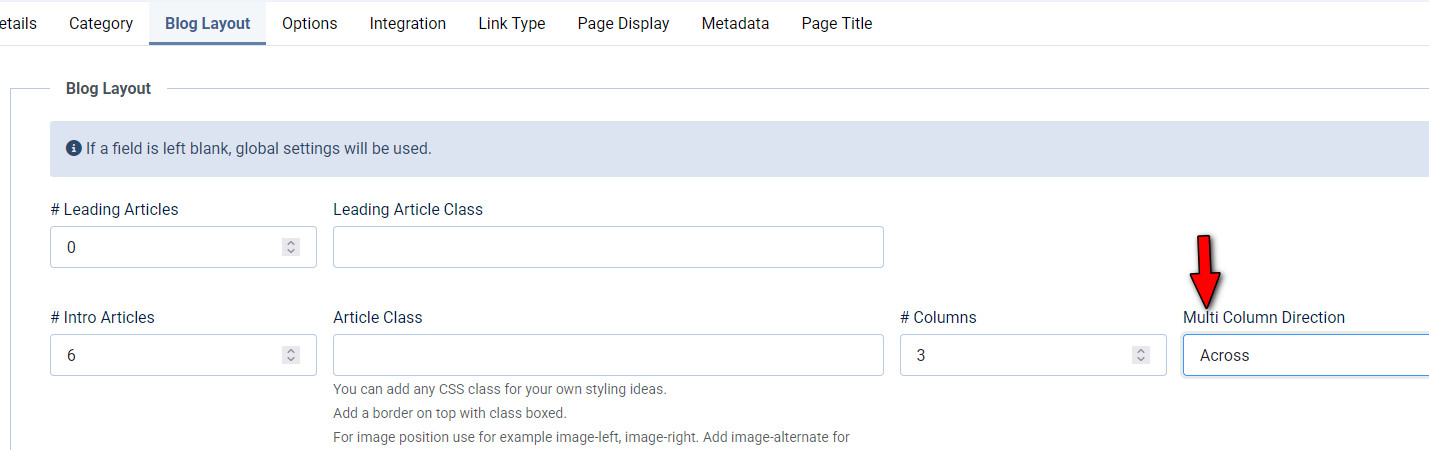
Currently, your Multi Column Direction is set to “Down.” With 3 columns configured and 4 articles available, Joomla calculates the grid as 3 columns × 2 rows. When the direction is set to Down, items are populated vertically first:
- Article 1 → Row 1, Column 1
- Article 2 → Row 2, Column 1
- Article 3 → Row 1, Column 2
- Article 4 → Row 2, Column 2
This leaves the third column without content, resulting in the uneven layout you’re experiencing.
Recommended Solution
Please change the Multi Column Direction to “Across.”
When set to Across, articles are placed horizontally:
- Article 1 → Row 1, Column 1
- Article 2 → Row 1, Column 2
- Article 3 → Row 1, Column 3
- Article 4 → Row 2, Column 1
This will correctly distribute the items across all three columns and resolve the visual imbalance.
Please note that this behavior is standard in Joomla core blog layouts and is not specific to the Helix Ultimate template.
Kindly test this adjustment and let us know if the layout behaves as expected.
Best regards

Paul Frankowski
Accepted AnswerHoi,
On my two sites where I tested, it worked, 3 or 4 columns. Please create hidden menu item, with 3 columns and share link to it. I will look tomorrow what can be a reason.
Make sure that 2nd and 3rd article, don't have any <div> or </div> inside intro content (!)
Now is late hour also in Holland. We are all sleepy and tired.
MoneyPeet
Accepted AnswerHi Paul,
indeed, it was too late last night. But thanks for the fast reply. The website is not "live" yet, so this is the link.
I have used standard articles, but build with Pagebuilder addon. But because the add-on doesn't have intro text, I used the intro text from the article.
Can you check please? When you need access to admin, please let me know.
Kind regards, Peter
Paul Frankowski
Accepted AnswerIndeed, in HTML there are 2 columns, but with 3 columns class name. Weird.
Yes, please share access.
MoneyPeet
Accepted AnswerHi Paul.
Yes, after all it was a simple misconfiguration from my end. But I didn't know, and have learned something new.
Thanks to both of you, it is now working perfect.
Kind regards, and have a nice day. Peter