

Header Problem
P
Peter
After update to the last version i see no headers anymore. In the backend i can see them but on my website they are gone.
17 Answers
Order by
Oldest

Atick Eashrak Shuvo
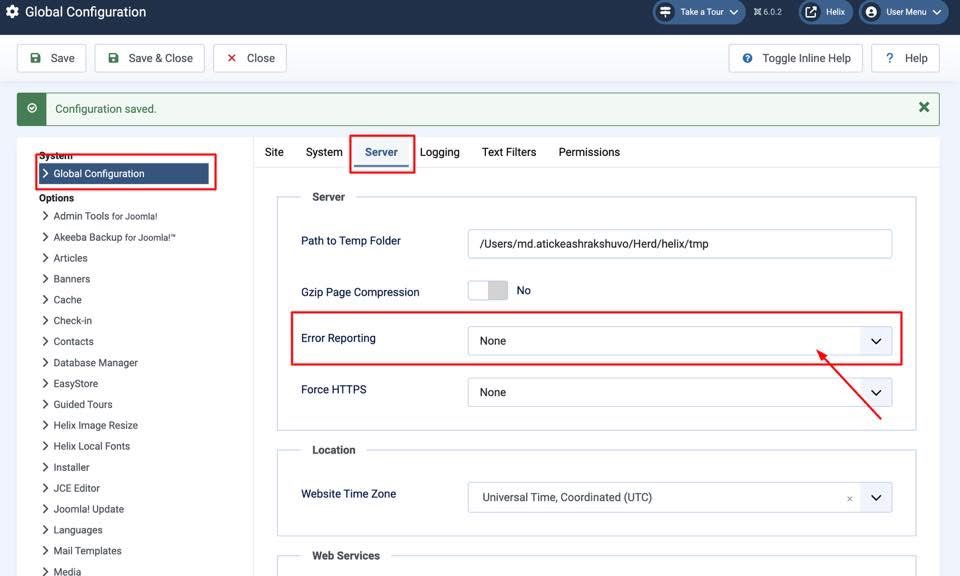
Accepted AnswerPlease navigate to Global Configuration → Server and set Error Reporting to None. This should resolve the issue.

Mehtaz Afsana Borsha
Accepted AnswerHI
Thanks for contacting us. It seems ok in my end. Could you please give me a screenshot of your issue?
-Regards.
P
Peter
Accepted Answer Mehtaz Afsana Borsha
Accepted AnswerHi
You can use this CSS and set the image address on that URL
.sp-page-builder .page-content #section-id-y5nFrKi2GWK-xQOMBDWo3 {
background-image: url() !important;
}
P
Peter
Accepted AnswerI have tryed it but it don't works fine. I still can't see anything. Sorry. By the way i have the same issue on website https://lameloverkapping.eu/
It happend after an update. I have updated many onther websites and those went wel but this 2 website did't go well. The strange thing is that I can see the images in the backend (front-end) but not on the front-end of the website.
Mehtaz Afsana Borsha
Accepted AnswerCould you please keep a full site backup and give me your super admin access? So that I can check.
P
Peter
Accepted AnswerSorry the loginname was wrong, please try again. See the login credentials in hidden content.
Mehtaz Afsana Borsha
Accepted AnswerHi
Please keep a full site backup and follow these steps.
- Reinstall the template
- Reinstall SPPB pro
- Clear your Joomla and Browser cache
If the above fails, then downgrade your Joomla version and check.
Please make sure you have a full site backup before making any changes
P
Peter
Accepted AnswerThe strange thing is that when I add a new header, like a new section called the library slideshow, I see it again. Apparently, the existing ones I've created don't work anymore.
Mehtaz Afsana Borsha
Accepted AnswerOk allow me some time please, I will inform our team about it.