

Helix Ultimate Gone Crazy URGENT
MH
Matt Hunt
Suddenly the Helix Ultimate has gone nuts. To the best of our knowledge, no one was in the admin of the site when suddenly the template just seems to have stopped functioning, especially the header/menu. I've downloaded and reinstalled Helix 2.2.4 , SP Page builder, downgraded the php to 8.2 and 8.1, then brought it back to 8.3. All with no effect.
Please help as soon as possible
20 Answers
Order by
Oldest

Atick Eashrak Shuvo
Accepted AnswerApologies for the inconvenience.
Could you please allow me to take a full backup of your site (files and database) so I can investigate the issue locally and identify the root cause?

Paul Frankowski
Accepted AnswerHi Matt.
Sorry, but "Username and password do not match or you do not have an account yet." Check details!
On all my sites, I can use PHP 8.2, 8.3, and 8.4 without "crazyness" , so it must be single case.
Paul Frankowski
Accepted AnswerI think I know why.
- This file „/templates/shaper_helixultimate/css/template.css” was locked by .htaccess file rule
Header always set X-Content-Type-Options "nosniff"- please remove it and save changes.

- Please also check if nobody deleted content of template.css file. If that file is empty, please reinstall template or upload file using FTP tool. Also check file permissions, it should be 644.
Then it should be OK.
MH
Matt Hunt
Accepted AnswerHi Paul I've comment out that line in the htaccess and verified that the template.css is still there and permissons are 644. I've also reset the password.
ThanksPaul Frankowski
Accepted Answer
looks that Joomla cannot load that file?!
Ok, I will check if I can login now.
Paul Frankowski
Accepted AnswerIt looks that there is something with your Joomla itself.
I only logged and went to Templates
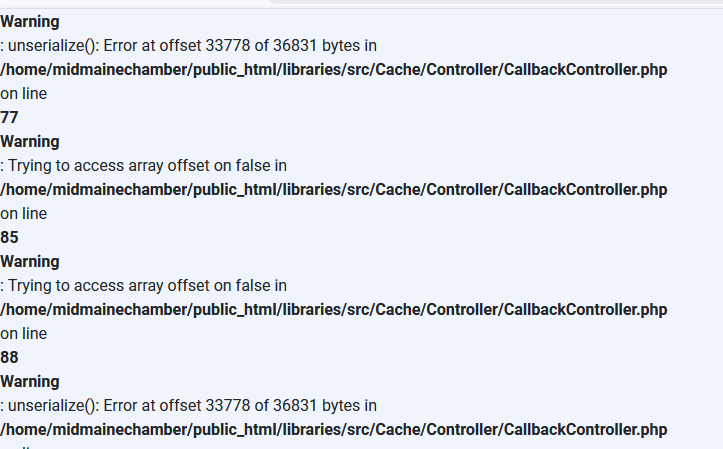
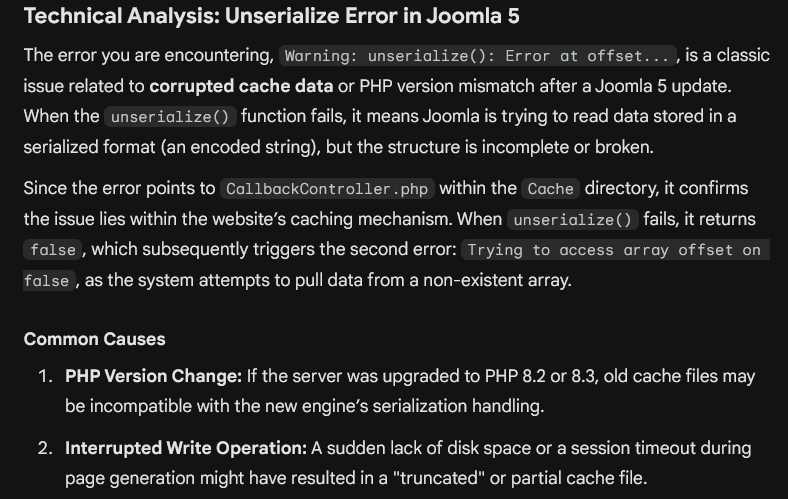
I cannot help more until you will not fix that.
MH
Matt Hunt
Accepted AnswerHi, Im nolonger getting that error. Just deleted the cache and gave it some more disk space
Paul Frankowski
Accepted AnswerThanks, indeed helped with Joomla.
And about problem, you forgot to delete/comment that line in .htaccess file, or save changes - hahaha ;)
Menu looks Ok now, you own me soda
MH
Matt Hunt
Accepted Answerhahaha, i owe you more than a soda! Thanks, Now using your crystal ball, how could that have gotten changed in the middle of the day? I was driving at the time and no one else that has access would touch the htaccess file?
Paul Frankowski
Accepted AnswerAnyway, solved. And You got to the destination safely.
Mark topic as solved, and you see next time, I hope not soon with "urgent", hahah
Have a wonderful day.
PG
Phillip Gailinas
Accepted Answersame issue, multiple sites.
PG
Phillip Gailinas
Accepted AnswerJust had this occur on multiple site which I had not been touching at the time. Developer tool says MIME mismatch. Reloaded Helix Ultimate with no change.
PG
Phillip Gailinas
Accepted AnswerTwo-step temporary workaround:
- copy {template}/css/template.css to {template}/css/template2.css
- Edit {template}/index.php to use template2.css instead of template.css This is a workaround. Somewhere in 'the system' the file named template.css was being blocked, but not other files in the same directory and .htacess does not appear to be doing it.
Paul Frankowski
Accepted Answer@Phillip,
Every day I see lots of websites, I have many too, and everything works fine on all of them, so I can't figure out why, all of a sudden and for no apparent reason, Joomla has simply stopped ignoring the presence of the template.css file. This is normal css file. If you or your hosting provider updated the server configuration, the MIME types might have been overwritten. This is the only reason I can imagine.
You can also use those lines inside .htaccess file
# Forcing correct MIME for CSS and JS files
AddType text/css .css
AddType application/javascript .js
@Matt, please add it too, It's best to add it right at the beginning.
A stronger alternative
<Files "template.css">
    Header set Content-Type "text/css"
</Files>
PG
Phillip Gailinas
Accepted AnswerAs 'magically' as it appeared yesterday, the problem is resolved today.
Though they won't admit it, I expect my service provider got some security setting wrong, but that's just my opinion.
Thanks for your attention on this matter!