Website - Question | JoomShaper

Website

F

fabrice

General 3 weeks ago

Hello, I'm having display issues with the responsive layout on the following website: https://www.bordescudoscharpente.fr/ When I view the site on my phone:

  • The menu doesn't appear.
  • The entire bottom section isn't responsive: the footer, etc. Can you help me? Thank you.
0
37 Answers
Rashida Rahman
Rashida Rahman
Accepted Answer
Support Agent 3 weeks ago #228748

Hi there!

Thanks for reaching out.

I can't access to your given url. Please check the screenshot:

https://cleanshot.com/share/czCjKDmc

Best regards,

0
F
fabrice
Accepted Answer
3 weeks ago #229114

I've done it : the conutry is unlocked.

0
Paul Frankowski
Paul Frankowski
Accepted Answer
Senior Staff 3 weeks ago #228749

Yes, please unlock some coutries from RSFirewall. It looks that you locked too many of them. And all we see is error 403, and we cannot help, doors are closed!

It also may slown down your site, becuase Joomla has to check each IP in huge database. I recommend to lock only 4-5 countries, to be honest. Yes, I talked with RSJoomla team about that too.

0
F
fabrice
Accepted Answer
3 weeks ago #229115

I've done it : both countries are unlocked.

0
Paul Frankowski
Paul Frankowski
Accepted Answer
Senior Staff 3 weeks ago #229130

Merci.

Mobile menu - the problem was with color of [=] icon, white color on white background.

Please in Template Options > Custom Code > Custom CSS add that line:

.burger-icon > span, #offcanvas-toggler span {background-color: black;}

0
Paul Frankowski
Paul Frankowski
Accepted Answer
Senior Staff 3 weeks ago #229132

About Footer Menu , it can be corrected by settings, using size of columns. Can you share access to admin area, or you need CSS that may solve it as Duct Tape?

0
F
fabrice
Accepted Answer
3 weeks ago #229153

It works, thank you so much Paul ! My only problem still remaining : a filter on the logo (it appears in black)

0
F
fabrice
Accepted Answer
3 weeks ago #229154

If possible, i'd like the CSS to solve the problem. thanks.

0
Paul Frankowski
Paul Frankowski
Accepted Answer
Senior Staff 3 weeks ago #229169

About Footer I would prefer to have access, CSS would be complicated.

0
F
fabrice
Accepted Answer
3 weeks ago #229194

OK. So can you explain me where i'll find the settings access for using size of columns ?

0
Paul Frankowski
Paul Frankowski
Accepted Answer
Senior Staff 3 weeks ago #229167

a filter on the logo

I see green. No CSS filters over the logo.

info__401.png

0
F
fabrice
Accepted Answer
3 weeks ago #229193

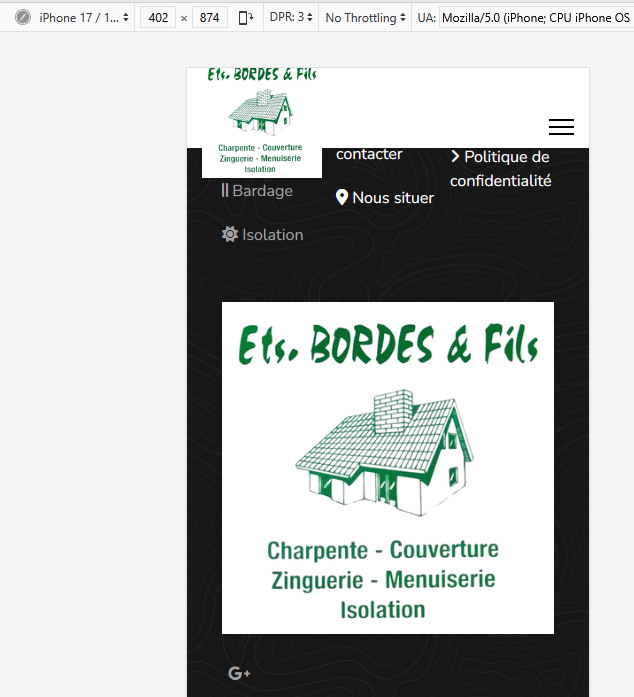
There's a black filter when i view the menus on a mobile phone

0
Paul Frankowski
Paul Frankowski
Accepted Answer
Senior Staff 3 weeks ago #229200

Do you talk about Logo color filter or logo height?

If 2nd, you should be able to change that from Template Options, or force by Custom CSS.

@media  (max-width: 680px) {
#sp-logo .logo-image {height: 100px;}
}

I see green logo also on Mobile view (iPhone)

info__405.png

0
F
fabrice
Accepted Answer
3 weeks ago #229262

I agree with you : but the filter is visible once you click on the menu, on the right side

0
Paul Frankowski
Paul Frankowski
Accepted Answer
Senior Staff 3 weeks ago #229203

First show me how you set that footer, now many modules, or if one, how its grid looks like?

Share link to image or video.

0
F
fabrice
Accepted Answer
2 weeks ago #229601

Dont know how to share you a screen shot : look what appears just above when I click to insert an image ... : ![]

0
Paul Frankowski
Paul Frankowski
Accepted Answer
Senior Staff 2 weeks ago #229640

upload to your server and share direct link to .jpg file, so simple

0
F
fabrice
Accepted Answer
1 week ago #230194
0
Paul Frankowski
Paul Frankowski
Accepted Answer
Senior Staff 1 week ago #230344

Use that Custom CSS and will be OK.

.offcanvas-menu .logo-image {  filter: none !important;}

indeed, there is green filter :/

0
F
fabrice
Accepted Answer
1 week ago #230381

It works !! thank you so much Paul ! Maybe some other points to check with you soon but it's better and better

1
Rashida Rahman
Rashida Rahman
Accepted Answer
Support Agent 6 days ago #230764

Hello,

We haven’t heard back from you regarding this issue. Could you please confirm if everything is working fine now? If so, kindly accept the most helpful answer to close the post.

Best regards,

0
F
fabrice
Accepted Answer
2 days ago #230983

everything is OK ! thank you

0
Rashida Rahman
Rashida Rahman
Accepted Answer
Support Agent 2 days ago #231002

You're always welcome:)

0
F
fabrice
Accepted Answer
2 days ago #230984

Paul, i need CSS that may solve it It looks lihe this on hone view : https://freeimage.host/i/CgJrZUF

0
Paul Frankowski
Paul Frankowski
Accepted Answer
Senior Staff 2 days ago #231004

Ok, I think I know... content below, after scroll down. You made mistake, in that Row/Section you used negative margins, here is CSS code that was used:

.sp-page-builder .page-content #section-id-Q6c6mJ5zr3wjEF17lrbBY {
  margin-top: -120px;
  margin-right: -120px;
  margin-bottom: -120px;
  margin-left: -120px;
}

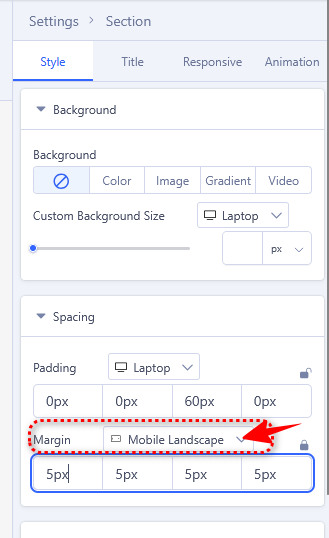
if you really need it on desktop view (???), change value for Mobile view (!) here
info__449.jpg

For Mobile view use normal values, it can be 0px or 10px. But never negative (-) , remember that simple rule. Don't make simple things harder. Have a nice day.

0
F
fabrice
Accepted Answer
1 day ago #231104

Paul, Here are screen 2 shots : it doesn't work ... but maybe i did'nt understand what you explained me ... I tryed both methods ... https://freeimage.host/i/CgOPPkb https://freeimage.host/i/CgOiGuj

and nowhere found to chose the mobile landscape

0
Paul Frankowski
Paul Frankowski
Accepted Answer
Senior Staff 1 day ago #231109

share access, I will fix it and make you a short video for next time. It will be easier & faster.

0
F
fabrice
Accepted Answer
1 day ago #231157

Paul, never done it before ... how can i share ?

0
Paul Frankowski
Paul Frankowski
Accepted Answer
Senior Staff 1 day ago #231160

In "Hidden Content" field add:

  1. Site URL (/administrator) probably
  2. create me a new Super User account
0
F
fabrice
Accepted Answer
1 day ago #231168

But need your e-mail adress to create it ? : see below https://freeimage.host/i/CrHO10N

0
Paul Frankowski
Paul Frankowski
Accepted Answer
Senior Staff 1 day ago #231173

It doesn't matter, you can be fake e-mail from your domain.

0
F
fabrice
Accepted Answer
1 day ago #231175

Login name Freek password : GtRv*/@P0152

0
Paul Frankowski
Paul Frankowski
Accepted Answer
Senior Staff 21 hours ago #231200

Thanks, but "Le mot de passe ne correspond pas au nom d'utilisateur, ou vous n'avez pas encore de compt"

0
F
fabrice
Accepted Answer
20 hours ago #231206

Try again : it works now !

0
Paul Frankowski
Paul Frankowski
Accepted Answer
Senior Staff 20 hours ago #231211

Solved, problem with negative margin was inside SPPB module "Footer"

info__464.jpg

Nothing is cut off now

1
F
fabrice
Accepted Answer
4 hours ago #231268

Thank you much Paul for your efficiency ! Have a nice day !

0
Paul Frankowski
Paul Frankowski
Accepted Answer
Senior Staff 4 hours ago #231271

mark topic as solved :)

1