

Critical Bug In SP Page Builder Pro After Upgrading
L
Latha
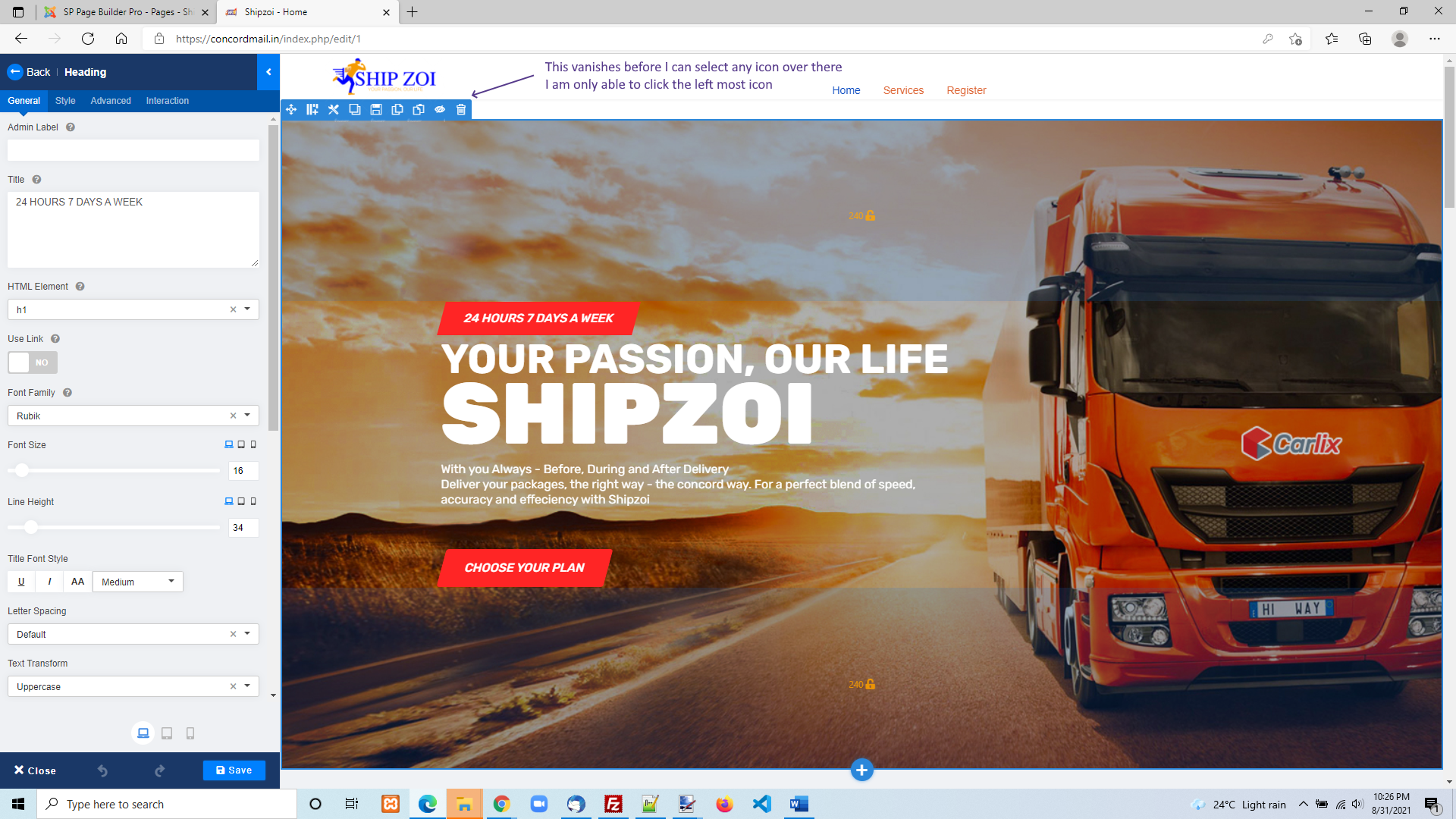
I am unable to select the icon mentioned below as it hides when i try to select. Looks like something has changed. Many users will be experiencing this issue for sure. I have tried both in Chrome and also in Edge. Both are behaving same way.
This is a CRITICAL BUG as I am unable to select the section icons (for eg delete) (this happens if the section is at the top
Website
https://concordmail.in
4 Answers
Order by
Oldest

Pavel
Accepted AnswerHi. I don't think this is a bug in SPPB. This is due to the positioning of your header and it only happens to you. Open the browser code inspector, find the header and set its z-index to 0. Or place an empty section and move it up temporarily
L
Latha
Accepted AnswerYeah, Yesterday i palced another empty section on top of it and was able to select the icon. However I was not able to remove the empty section. Let me try your code inspector option. Thank you for suggesting this. Appreciate your help here.

Muntasir Sakib
Accepted AnswerHello Narayanan,
Pavel is absolutely right.
We are glad that you have already figured it out as well.
Thanks!