Quickstart - Forum | JoomShaper
Staff replied Templates

Quickstart

Asked by Viktoria Wolf 5 years ago Last activity 5 years ago

Is there any way of installing the quickstart template even though I cannot set up an individual Database with my host? I don't have direct access to the databases on their server and can only install Joomla via their platform.

Thanks for any advice.

Viki

5 replies

Paul Frankowski Senior Staff

If I may...

Quickstart include Joomla inside, and that needs database. This same would be for Drupal and Wordpress.

If you don't have access to create a new database but you have access to files (!) you can use this trick:

  1. Install Joomla via cPanel (hosting platform) do all steps - after you should see demo joomla site.
  2. Then use File manager and edit file configuration.php - copy content from it to your notepad
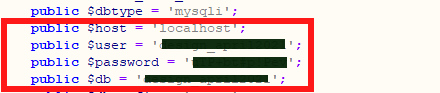
  3. Later you need to use from it host name, user name, database name and password.
  4. Delete all folders and files from preinstalled Joomla (from step 1)
  5. Upload all files from our joomshaper quickstart (unzip before, if you cannot unzip on server)
  6. Run installer - follow all step
  7. Use Database access (from 3)

If you don't have access to File Manager - ask hosting support (!)

Viktoria Wolf Asked this

Thank you Paul, I will try this :)

Viktoria Wolf Asked this

I was able to start the installer, but received an error message - could not connect to MySQLi

I did install Joomla and set up a database but apparently the installation does not work...

Paul Frankowski Senior Staff
5 years ago · edited

Sorry, but you have to contact with Hosting Support this time.

OR

Probably you done something wrong during copying database access data.
Wrong database name / user name / password / host name.
Remember to copy content from " "

Example configuration.php file:

data-base-access.jpg

Log in to reply.