After update to the last version i see no headers anymore. In the backend i can see them but on my website they are gone.
Solved
SP Page Builder
header problem
Accepted answer
Marked as the solution
Atick Eashrak Shuvo Staff
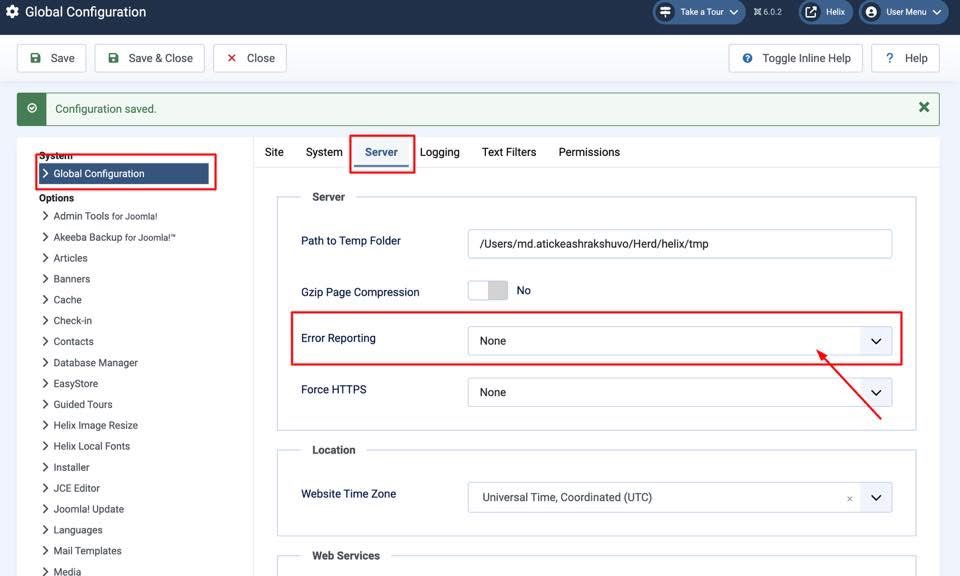
Please navigate to Global Configuration → Server and set Error Reporting to None. This should resolve the issue.
15 more replies

Mehtaz Afsana Borsha Staff
HI
Thanks for contacting us. It seems ok in my end. Could you please give me a screenshot of your issue?
-Regards.
Peter Asked this
7 months ago
· edited
Mehtaz Afsana Borsha Staff
Hi
You can use this CSS and set the image address on that URL
.sp-page-builder .page-content #section-id-y5nFrKi2GWK-xQOMBDWo3 {
background-image: url() !important;
}
Peter Asked this
7 months ago
· edited
I have tryed it but it don't works fine. I still can't see anything. Sorry.
By the way i have the same issue on website https://lameloverkapping.eu/
It happend after an update. I have updated many onther websites and those went wel but this 2 website did't go well.
The strange thing is that I can see the images in the backend (front-end) but not on the front-end of the website.
Mehtaz Afsana Borsha Staff
Could you please keep a full site backup and give me your super admin access? So that I can check.
Peter Asked this
7 months ago
· edited
Hi i have put the logins in the hidden content.
Mehtaz Afsana Borsha Staff
Hi
I cant not access on that.
Peter Asked this
Sorry the loginname was wrong, please try again. See the login credentials in hidden content.
Mehtaz Afsana Borsha Staff
Hi
Please keep a full site backup and follow these steps.
- Reinstall the template
- Reinstall SPPB pro
- Clear your Joomla and Browser cache
If the above fails, then downgrade your Joomla version and check.
Please make sure you have a full site backup before making any changes
Peter Asked this
Done, but the problem is still not solved.
Peter Asked this
The strange thing is that when I add a new header, like a new section called the library slideshow, I see it again. Apparently, the existing ones I've created don't work anymore.
Mehtaz Afsana Borsha Staff
Ok allow me some time please, I will inform our team about it.
Peter Asked this
Hi Mehtaz Afsana Borsha, when do you think the problem is solved? Still no answer after 3 days.
Sorry but it taking to long for my custumers... They start complain.
Please let me know...
Peter Asked this
Mehtaz Afsana Borsha, i still don 't got any answer?
Peter Asked this
Thanks Atick Eashrak Shuvo for your help.
Mehtaz Afsana Borsha Staff
Hi
Glad to know that its solved and thanks for accepting the answer.
Log in to reply.