custom.css does not work after updating
after the update:
https://backup.trendweb.pl/templates/folium/css/custom.css
https://backup.trendweb.pl/kontakt
before updating:
custom.css does not work after updating
after the update:
https://backup.trendweb.pl/templates/folium/css/custom.css
https://backup.trendweb.pl/kontakt
before updating:
hi the place of custom.css changed make a rep css/custom and put your file inside
it does not work
Hi,
Give me your super admin access on the hidden content please. So that I can check
-Regards
Hi
do you have any information for me?
I'd like to update more projects and I don't know how to do custom.css
Hi. Looks like both work. Clean the cache.
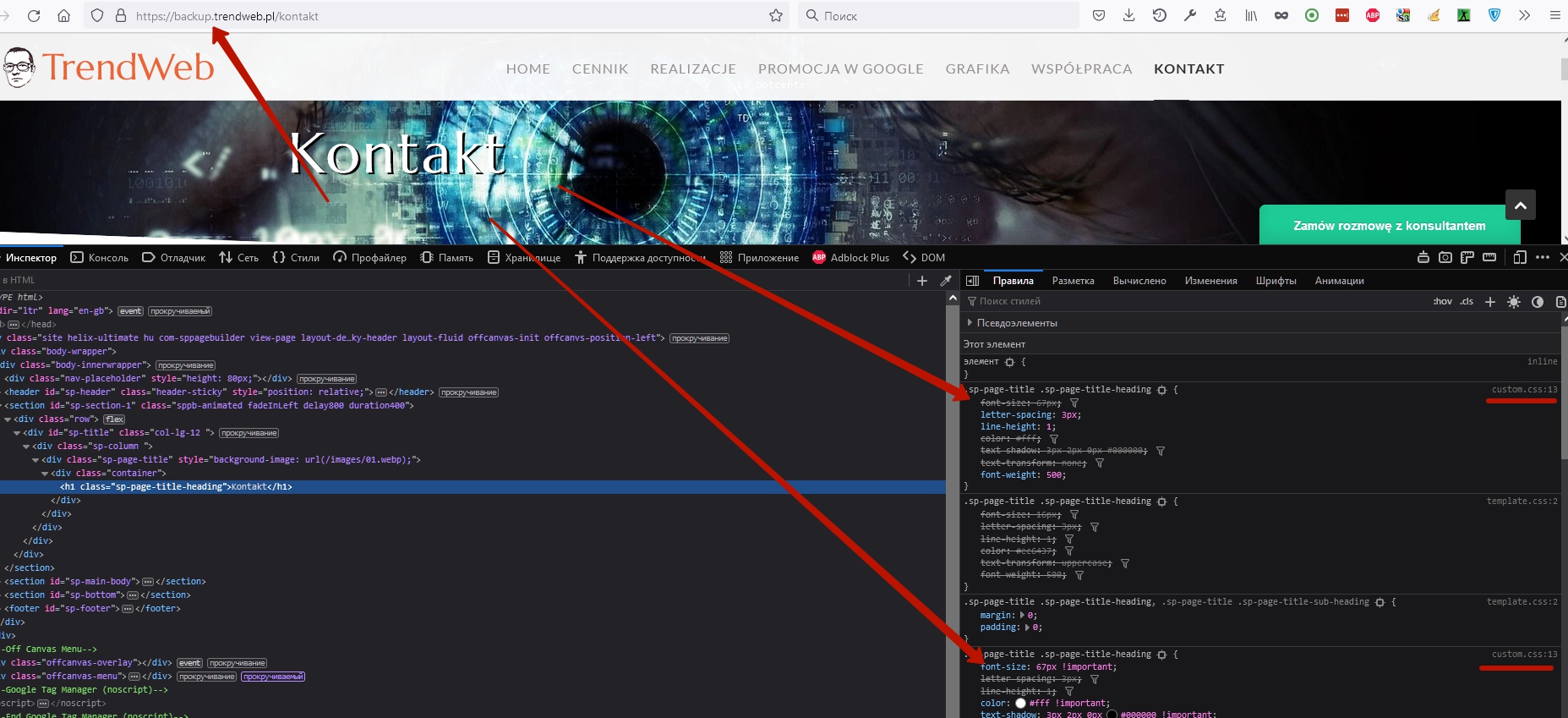
once it works once it doesn't work,
each of you writes differently
very hard conversation with several people, each on a different topic
gourou
1 day ago
hi the place of custom.css changed make a rep css/custom and put your file inside
what are the rules custom.css - joomla 4 ???
I am not an employee of support. Just looked at your site and see that it works. That is, this problem is only on your side. I did not come across the situation when it does not work. This is only a cache question.
Your own CSS files you can place in two places. As before, the custom.css file works in the same location. Additionally, you can create a folder named "custom" and place any quantity CSS files there with any names you want.
as I wrote, once it works, once not
another project after the update:
https://backup.korabgarden.pl/pl/
https://backup.korabgarden.pl/templates/gourmand/css/custom.css
before updating
https://korabgarden.pl/templates/gourmand/css/custom.css
example:
Hi,
You can follow Pavels instruction. Its also working on my side
And by the way you can also use !important after css and you can also follow this css path
Mehtaz Afsana Borsha:
another project after the update:
https://backup.korabgarden.pl/pl/
https://backup.korabgarden.pl/templates/gourmand/css/custom.css
before updating
https://korabgarden.pl/templates/gourmand/css/custom.css
example:
???
Should I create a new ticket or will I get a reply?
It works, just the selector is not quite weighty to override the preset.
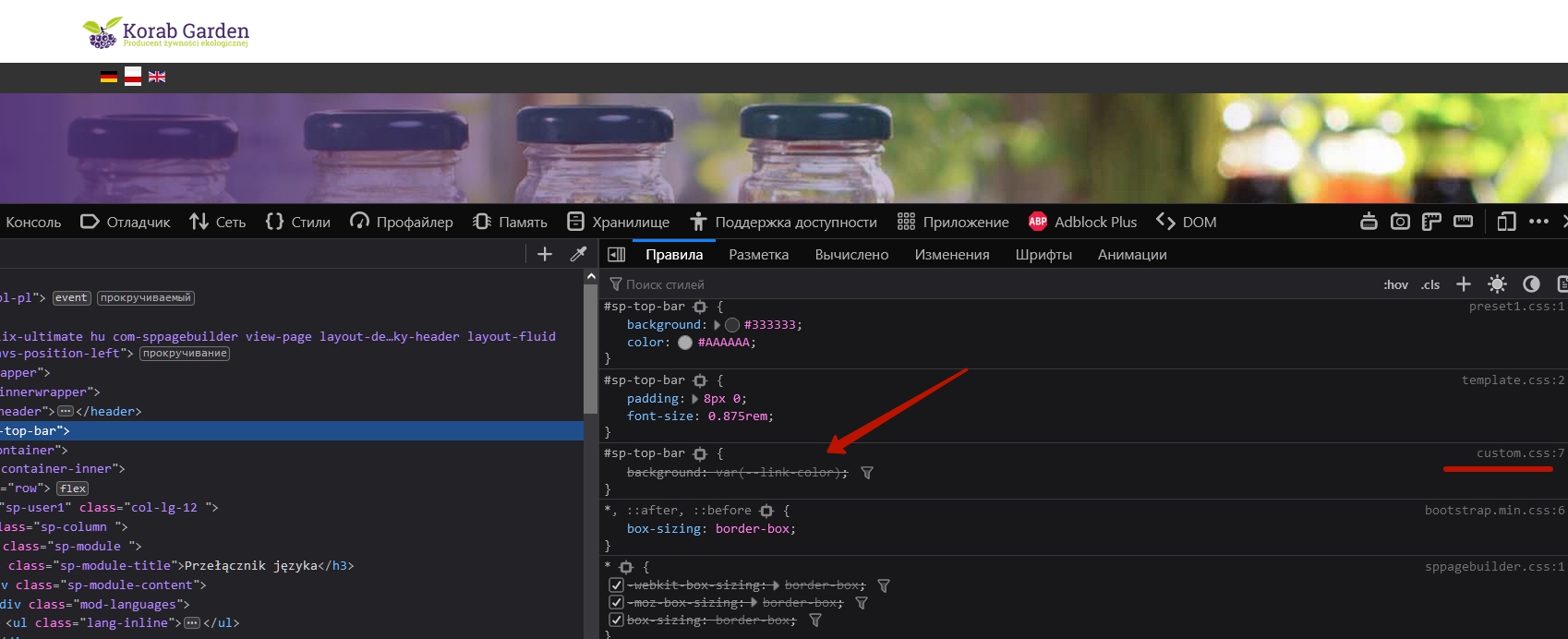
Use "!important"

The browser code inspector will answer all the questions. Use it more deeply.
But at the same time, there is a problem. It lies in the fact that custom.css is located above what should be. Therefore, you need a stronger code to override template.css and preset-x.css. This is the question of the team.
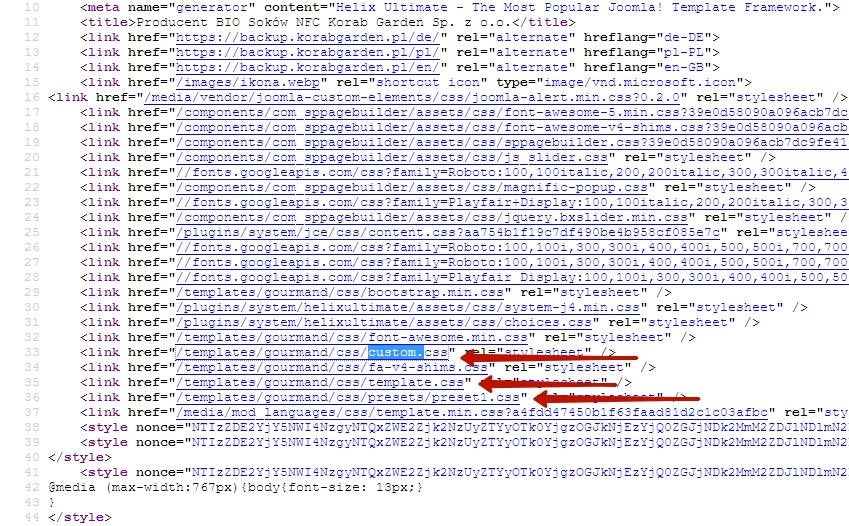
and here's the problem
This is the question of the team.
the team is not responding!!!
I have a lot of projects to update where custom css is very extensive
I don't know what to do, half of it works, the other half of custom doesn't work
In the basic Helix Ultimate this problem is not exist. Most likely, before updating the template it will not be corrected. You can fix it yourself. Open index.php, find and move these two lines of code to the place as shown in the screenshot (above //Before Head). Do not forget to make a backup before.
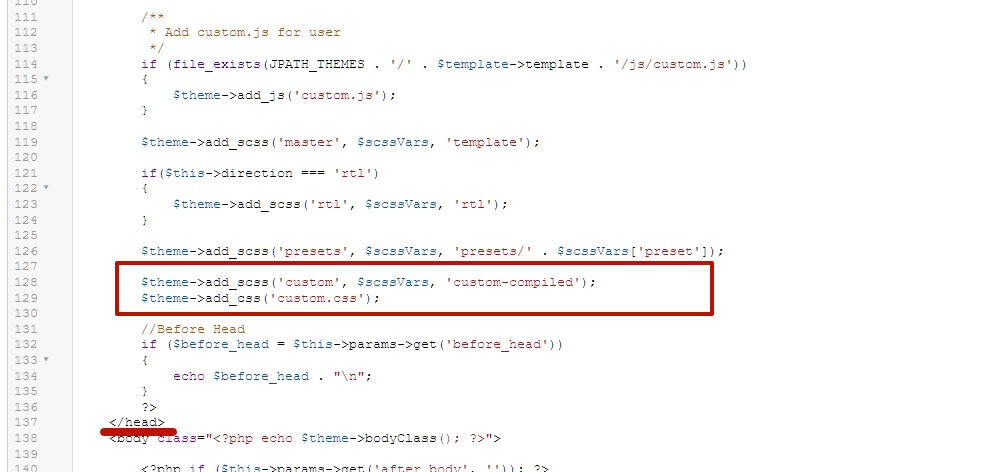
my index.php looks different
I wrote about it a month ago
https://www.joomshaper.com/forum/question/6310
recently there was an update of templates, the problem is still the same
Move this line here.
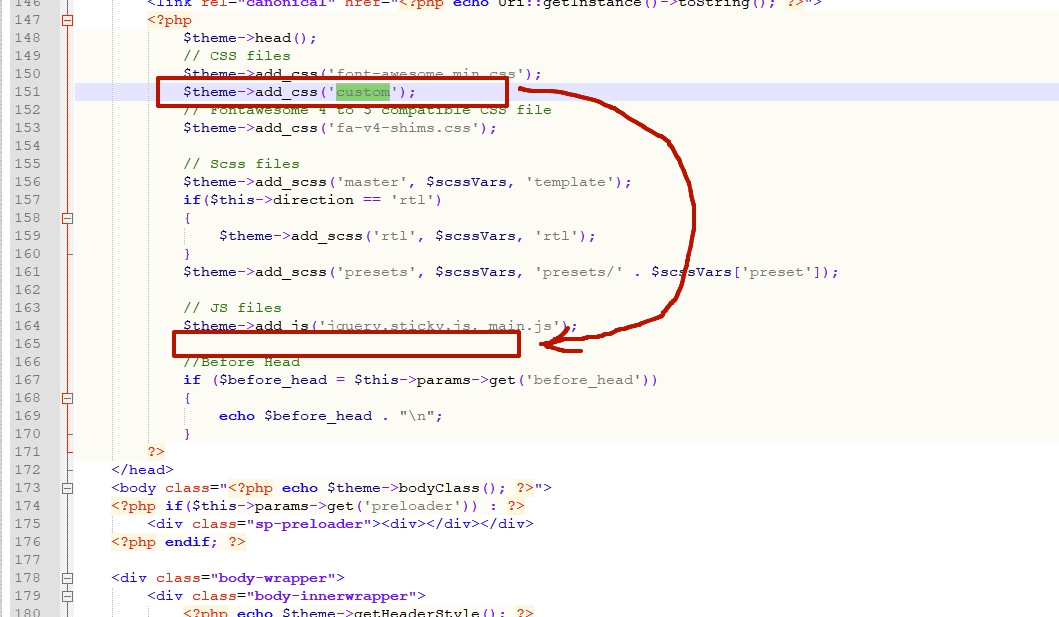
And check.
And maybe you will need to add an extra line under this one.
$theme->add_css('custom.css');great thank you, it helped
https://backup.korabgarden.pl/pl/
it was a gourmand template, then i'll see the folium
i wonder why the band didn't write about it sooner
i wonder why the band didn't write about it sooner
I think this is the mistake of the developer team, which the support team does not know.
I am glad that you managed to solve the problem
the problem is that for 1 improvement there are so many new bugs and the support team 1 level always seems to discover as new problem even related by many users, asking the same silly question and if no solution so its probably cache problem or often the problem is staying without answer.
perhaps it shoud be better to make on the top of the forum the list of known template or framework bugs still not solved, and also sharing the solution for them in a public area for all customers.
and please hire a bug tracker staff its not a customer job. Before update check in your site in depth all packages to download . The quality is something we pay for
Sorry for this inconvenience. There is a lot of pressure that's why late reply. Please take my apology. And yes there are so many issues with updating templates and our team is working on it. I hope upcoming updates all issues will be fixed
Sorry again
Additionally, I want to add that for the support agents is extremely important to be able to know well the structure of the products and be able to use the code inspector. This will solve problems very quickly, instead of a multi-day correspondence to gain access. In 90% of cases, access is not required and problems are solved very quickly if you use the code inspector.
This topic is proof of this.
This topic exists 2 days. Of them to solve the problem it took two hours, taking into account the delay in the correspondence. And clean time to solve, without delay in the correspondence - 15 minutes.
Thanks Pavel for your opinion

