Lesson Topics
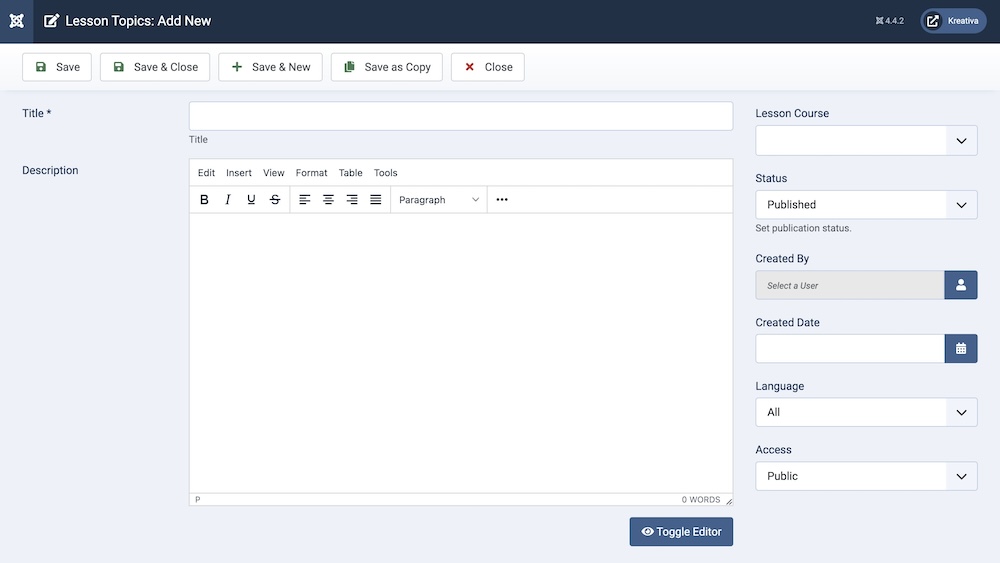
Title: It is the name of the lesson.
Description: This is where you need to write a description of the lesson.
Lesson Course: From the dropdown menu, select the course which this lesson is a part of.
Status: You can show/hide a lesson by changing its status from Published/Unpublished.
Created By: The person who creates a lesson will be automatically assigned to this field once the lesson is created, but an admin (Super User) can change the user at any time.
Created Date: Clicking on the calendar icon will enable you to set a different date for the creation date but if left blank, it will automatically take the current date when the course is created.
Language: Specifies the language for this category. If your site is multilingual, you can assign the category to a specific language. If it's meant to be available in all languages, you can set it to "All".
Access: Controls which user groups can view this category. You can restrict access to certain categories based on user permissions. You can choose between
- Public
- Guest
- Registered
- Special
- Super Users