

Customization Of Add-on
AS
Andre Szpyrka
Hello!
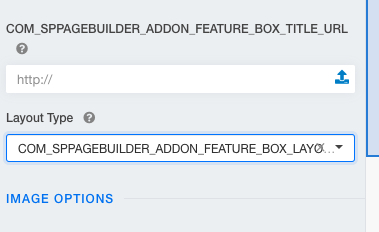
Well, I contact you because my boss asks me to reproduce Educon template from scratch to deeply understand the workflow of Joomla. All goes well to imitate it, but I'm stuck with some modifications you made. I don't comprehend where you have customised add-on like featured box (cf. screenshot). May you help me to find where it is?
In advance, thanks
2 Answers
Order by
Oldest

Paul Frankowski
Accepted AnswerHI, do you mean that english label of those options are missing right?
As I know that addon was overriden in that template (here: templates\shaper_educon\sppagebuilder\addons\feature) and probably few phrases are missing.
Easy to fix in 90sec:
COM_SPPAGEBUILDER_ADDON_FEATURE_BOX_TITLE_URL
must be: Title URL
COM_SPPAGEBUILDER_ADDON_FEATURE_BOX_LAYOUT_TYPE_ICON
must be: Icon
COM_SPPAGEBUILDER_ADDON_FEATURE_BOX_LAYOUT_TYPE_IMAGE
must be: Image
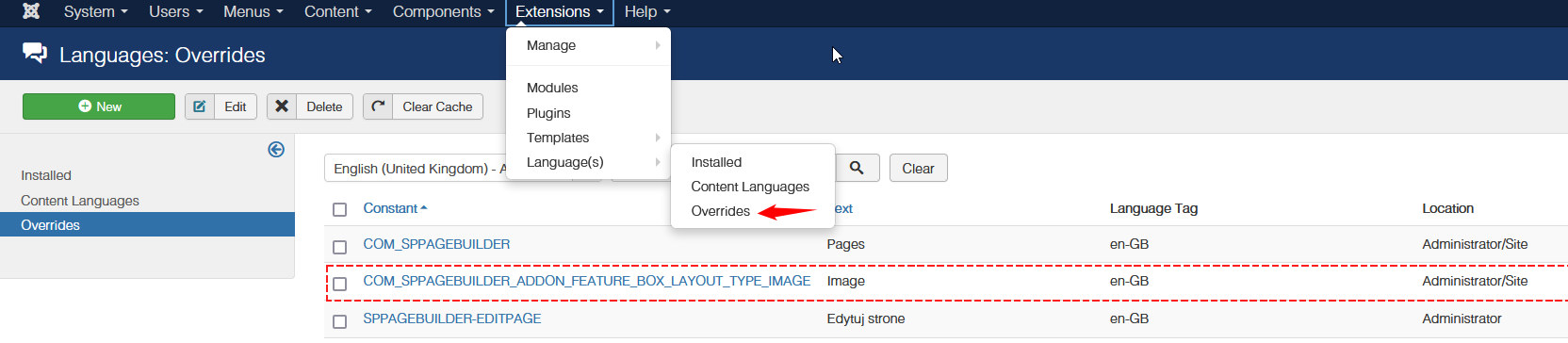
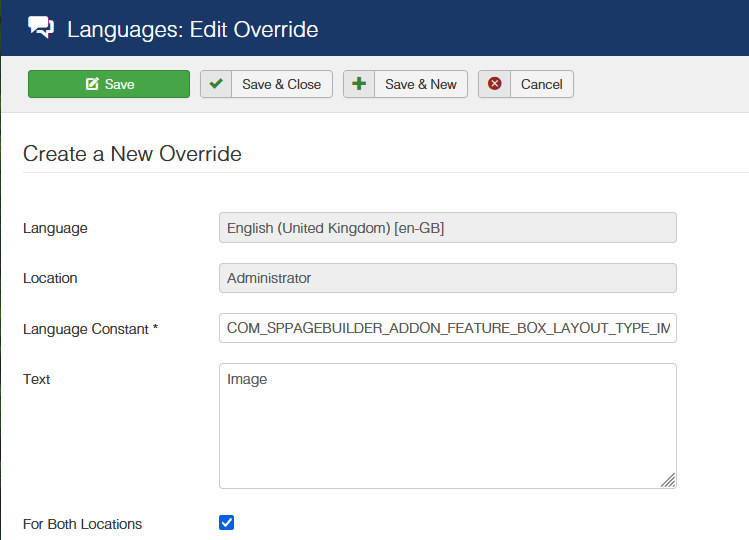
Use this method to translate / fix (screenshot from J3, but in Joomla 4 is very similar). In Languages: Overrides - choose your default admin language and click "New" then insert phrase and in "Text" field translation or just english word. Remember to click [x] for Both locations. Save.
OR as alternative way, please download Educon template again and re-install. I added missing phrases.