4 Answers
Order by
Oldest

Rashida Rahman
Accepted AnswerHi there!
Thanks for your query.
Would you please describe your wish a little bit more to understand it better?
However, the following documentation may help, the title is "How to create second top menu":
https://www.joomshaper.com/documentation/helix-framework/helixultimate/faq-how-to-do
Best Regards
N
nynol
Accepted AnswerThanks, but I want to put the second menu as a new line in the header.
Like on this website: https://www.schulewirtschaft.de/
Thanks

Paul Frankowski
Accepted AnswerHi Nylon,
In your example

structure is quite basic.
And my suggestion is...
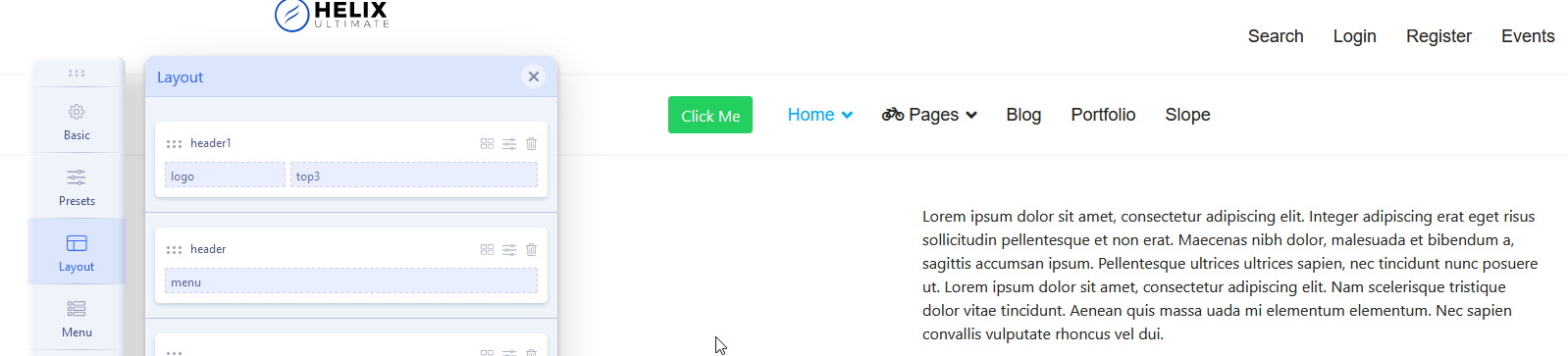
- Create Custom "Header1" (do not use predefined one, disable it) - info in Helix manual.
- In Header put two columns (3+9) with those module positions: logo + top3
- In top3 publish extra menu module according to guide from documentation may help, the title is "How to create second top menu" OR use different menu module if you really need there a Megamenu structure.
- Below Header1 add new row but this time name it "header" - put there only "menu" module position - so there will be used Helix MegaMenu.
- Use custom CSS to fit design goals.