
Hi,
I have this error of Image Folder Path Not Found https://ibb.co.com/GGYYDcL
Use latest joomla and latest sppb. Maybe someone know how to fix? only have this problem from backend.
Hi,
I have this error of Image Folder Path Not Found https://ibb.co.com/GGYYDcL
Use latest joomla and latest sppb. Maybe someone know how to fix? only have this problem from backend.
Hi there!
Thank you for bringing this to our attention, and I sincerely apologize for the inconvenience caused.
To assist you more effectively, may I kindly request temporary administrative access to your site? This will allow me to thoroughly investigate and resolve the issue for you.
Before sharing the credentials, I strongly recommend taking a complete backup of your site to ensure all data remains secure.
Looking forward to your response.
Best regards
I am guessing that you have Joomla 5.3, in that case go to Content > Media > Options > Path to Images Folder and check used value. Example (default in most cases)
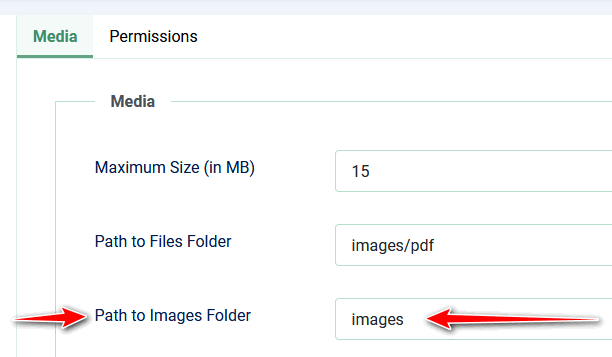
if you have empty value, use images (if you have that folder)
check also "Path to files folder" input field
Hi Paul,
I already have it set already as it should, i guess https://ibb.co.com/WvHbz2Rj
This problem only if i try to access image library from frontend.
can you show me screenshot from front-end
Hi Paul,
As on my first post https://ibb.co.com/GGYYDcL
The last question do you have that issue on all your sites, or only one?
On my site Joomla 5.3 + PHP 8.3, I still can see Files & Folders - also in frond-end editor.
only this one, i just fresh install this... i also not sure why... just to let you guys know...
Hi,
This happen again on latest update version... accessing images folder from sppb frontend goes image folder path not found..
Probably you have to share access to back-end for our developer.
Q: in back-end editor is still OK?