When I try to automatically update, I get the error "Checksum verification failed."
I downloaded and installed the plg_system_helixultimate_v2.2.10 plugin manually, and the site crashed!
When I try to automatically update, I get the error "Checksum verification failed."
I downloaded and installed the plg_system_helixultimate_v2.2.10 plugin manually, and the site crashed!
Hi there!
Thank you for bringing this to our attention, and I sincerely apologize for the inconvenience caused.
To assist you more effectively, may I kindly request temporary administrative access to your site? This will allow me to thoroughly investigate and resolve the issue for you.
Before sharing the credentials, I strongly recommend taking a complete backup of your site to ensure all data remains secure.
Looking forward to your response.
Best regards
hidden content
Where you are getting the error?
...
It seems to be a problem with PHP version, can you switch/enable PHP 8.4.1
If somehow you cannot, please use FTP and override plugin folder using older version of Helix plugin. Just take from backup or template package. It should be in plugins/system/helixultimate
We have to check that, becuase so far you're first person with that issue/problem so far.
switched to PHP 8.4.24
Now all works. Front and Back-end.
Thanks.
So, does upgrading to plg_system_helixultimate_v2.2.10 require PHP 8.4?
To find out for other sites I need to upgrade
Probably yes , but I asked our developer for details. Ping me in next 2 hours, okay?
You can wait with the update to be sure.
Okay, I'll wait.
And still, even with PHP 8.4, the error "Checksum verification failed" remains when I try to do the automatic update.
But it's strange, because last week I updated several sites, on the same server, with the same version of Joomla, with PHP 8.3, and I had no problems.
This morning, however, I got this error on the remaining sites.
you can just download and install (if you have PHP 8.4 already)
Hi, I would just like to add that I just experienced the same issue with the update on a website today. The website is running on PHP 8.3, and after the update to Helix Ultimate 2.2.10, the entire site, frontend and backend, are not usable and show the error that PHP 8.4 is required. I need to get access to the hosting panel from my customer, so that I can try PHP 8.4.
The strange thing is that in the last few days I have updated around 20 sites to Helix Ultimate 2.2.10, all running PHP 8.3, and this issue did not occur.
I still did not gain access to the hosting panel of the customer, unfortunately this issue happened first exactly on one of the sites that I run, which is hosted on an external service and not on my own servers.
I just see the error "Composer detected issues in your platform: Your Composer dependencies require a PHP version ">= 8.4.1". You are running 8.3.30." in the backend and frontend.
Without information from Server Error Logs hard to say more. Can you check it / share.
I was able to access the hosting panel now, but there are no error logs besides the error 500 on the site, following the update, with the message already cited "Composer detected issues in your platform: Your Composer dependencies require a PHP version ">= 8.4.1". You are running 8.3.30.".
But I activated Joomla Debug mode and I see the error coming from here: JROOT/plugins/system/helixultimate/vendor/composer/platform_check.php:22
which contains the following statement
if (!(PHP_VERSION_ID >= 80401)) {
$issues[] = 'Your Composer dependencies require a PHP version ">= 8.4.1". You are running ' . PHP_VERSION . '.';
}
The documentation of Helix ultimate states, though, that it should support PHP 8.3 as well
I would also like to add that on the 20 sites that I updated to Helix Ultimate 2.2.10 until one-two days ago, the same line at platform_check.php:22 stated:
if (!(PHP_VERSION_ID >= 80200)) {
$issues[] = 'Your Composer dependencies require a PHP version ">= 8.2.0". You are running ' . PHP_VERSION . '.';
}
So it seems this piece of code was changed subsequently in the same version?
Update: fixing that block of code also removes the error from the site.
In Joomshaper download section there is still version that can be used in PHP 8.2, 8.3, 8.4 and 8.5.
I shared Beta version that fixed problem with custom.css order , but indeed, needed higher PHP 8 version.
That's all. I guess in upcoming days, 2.2.11 will appear. But before publishing we'll test on different PHP versions.
Having the same issue running PHP 8.4: "The checksum verification failed. Please make sure you are using the correct update server!" with my sites. What's the proposed solution here?
Regards
Don
plg_system_helixultimate_v2.2.10 (php83).zip
Just download plugin and install it. The same you can do from our Download section.
I informed the team, tomorrow morning our team member will look into update system (Time Zone difference).
I have the same problem
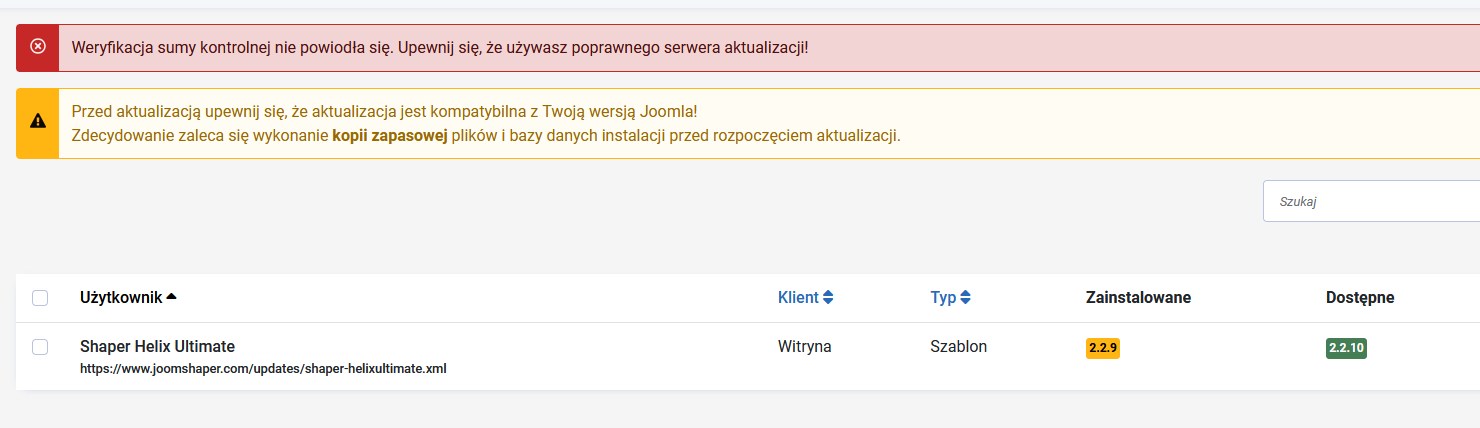
Joomla 5.4.8
PHP: 8.3.25
Cześć Dark, dokładnie. To jest nasz błąd, który będzie najdalej jutro poprawiony.
Masz dwie opcje: wgrać nową wersje szablonu (teraz), albo poczekać do jutra na one-click-update.

