Hi There,
I am have an issue with background videos on sp page builder.
Sometimes when I load a page with a background video (about 1 in every 5 times) there is a random gap appearing at the bottom. Please see the page here: https://cyberprotect.infosec-cloud.com/component/sppagebuilder/?view=page&id=96
I've checked for rouge margin etcs but can't find out how to fix it.
Please can you advise.
Many thanks
Sarah Payne
Awaiting an answer
SP Page Builder
Space after background video
6 replies

Ariba Staff
Hello
Thank you for your query.
Let me take a look at the issue.

Mehtaz Afsana Borsha Staff
Hi
Use this custom css
.sp-page-builder .page-content #section-id-1627395588820{
    padding: 0px !important;
}
Add this css code inside the custom.css file.
Note: Path towards custom CSS:
Extensions>Templates>Styles>
Click on your current default template name then choose Template Options.
Then find custom CSS within the custom code.
https://prnt.sc/pu705g
https://prnt.sc/pu70zn
In Extensions>Template> Template Options > Custom Code > Custom CSS please add this
Thanks
Ariba Staff
5 years ago
· edited
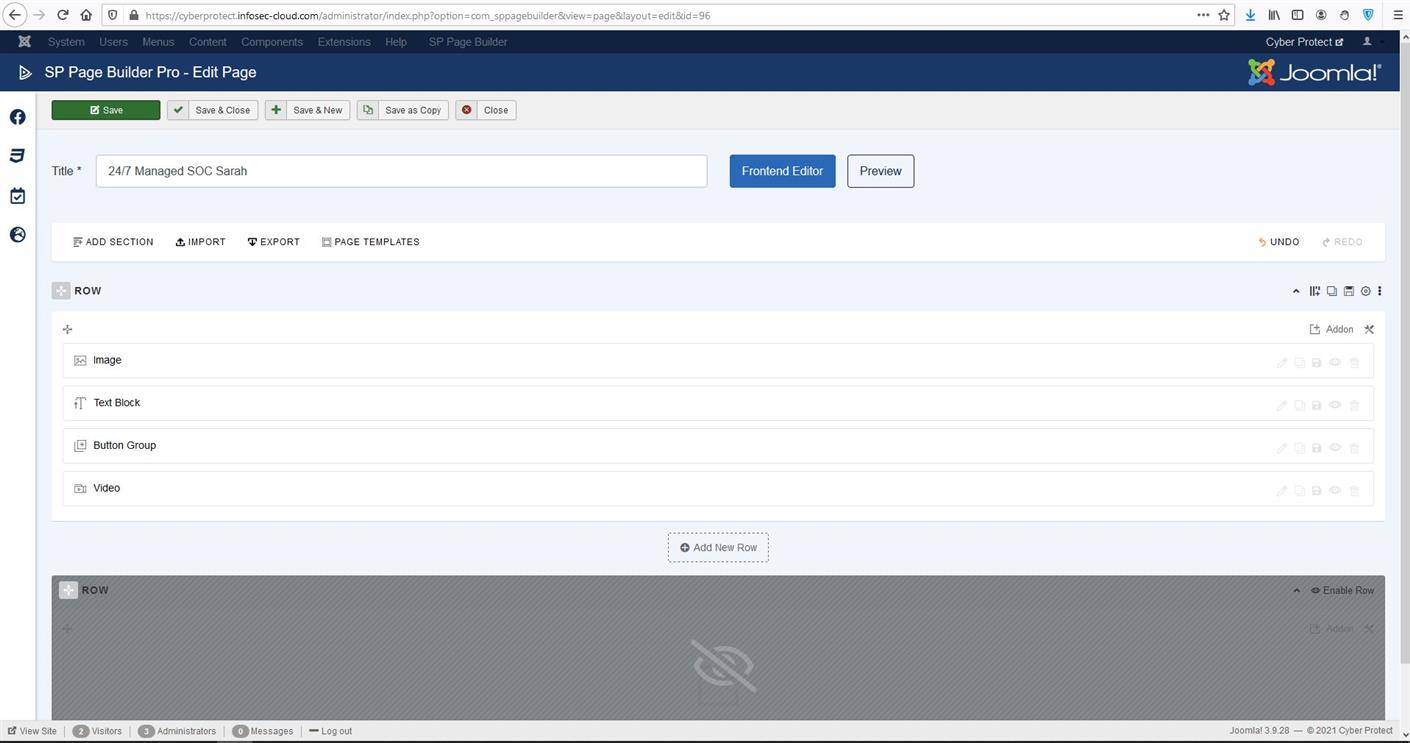
Please check the screenshot below.
There was an extra row inside the page. I have disabled the row and your gap is gone now. Hope that helps you.
digitalhouse Asked this
Hi there,
Neither of these options worked.
I figure out it is the animation on the addons which caused this space.
Have you got any idea how I can keep the animation without creating the random space at the bottom.
Thanks,
Mehtaz Afsana Borsha Staff
Did you try the css which I gave you?
Ariba Staff
Hello
Could you kindly share a video of the issue please? That would be very helpful to understand better because after applying the solution I provided I could not see any gap from my end.
Log in to reply.