Cannot access protected property Joomla\CMS\Menu\MenuItem::$params - Forum | JoomShaper
Solved Templates

Cannot access protected property Joomla\CMS\Menu\MenuItem::$params

Asked by Pilar 1 year ago Last activity 1 year ago

Hi
I have updated my site from 3.10 to 4 and I have this message
Cannot access protected property Joomla\CMS\Menu\MenuItem::$params
I have followed the steps I found here: https://www.joomshaper.com/forum/question/36772
and updated again, same result.
I moved to J5 to try something different, same result.
I switched to debug mode and I have this table, I dont understand :)
Call Stack

Function Location

1 () JROOT/templates/themis/features/title.php:28
2 HelixUltimateFeatureTitle->renderFeature() JROOT/plugins/system/helixultimate/src/Core/HelixUltimate.php:557
3 HelixUltimate\Framework\Core\HelixUltimate->include_features() JROOT/plugins/system/helixultimate/src/Core/HelixUltimate.php:575
4 HelixUltimate\Framework\Core\HelixUltimate->render_layout() JROOT/templates/themis/index.php:144
5 require() JROOT/libraries/src/Document/HtmlDocument.php:731
6 Joomla\CMS\Document\HtmlDocument->_loadTemplate() JROOT/libraries/src/Document/HtmlDocument.php:785
7 Joomla\CMS\Document\HtmlDocument->_fetchTemplate() JROOT/libraries/src/Document/HtmlDocument.php:622
8 Joomla\CMS\Document\HtmlDocument->parse() JROOT/libraries/src/Application/CMSApplication.php:1057
9 Joomla\CMS\Application\CMSApplication->render() JROOT/libraries/src/Application/SiteApplication.php:732
10 Joomla\CMS\Application\SiteApplication->render() JROOT/libraries/src/Application/CMSApplication.php:311
11 Joomla\CMS\Application\CMSApplication->execute() JROOT/includes/app.php:58
12 require_once() JROOT/index.php:32

Could you please support me?
Thanks

Accepted answer

Marked as the solution
Paul Frankowski Senior Staff
1 year ago · edited

Hi Pilar,

  1. Have you updated template to last version? You should have Themis v2.0.1 installed.
  2. Temporary solution:
  • Download Helix Ultimate template
  • Unzip it
  • Using FTP copy all files from : template/features to here (override all) templates/themis/features
  1. Reinstall Helix Ultimate plugin (v2.1.1)

10 more replies

Pilar Asked this

Hi Paul,

Thank you for your prompt response and support.

Yes, I remember reading something about that in one of your articles before, but I had forgotten.

The update has been completed, but I have one more thing to ask. On mobile screens, the navbar disappears, and I can’t find anything in the theme documentation on how to fix it.

Could you please give me a hint?

Thanks

Paul Frankowski Senior Staff

You're welcome.


What is "navbar" on your website?

Please share website URL + screenshot link if possible.

Paul Frankowski Senior Staff

So "navbar" in your case is "offcanvas" (mobile) menu.
Checking... I will let you know.

Paul Frankowski Senior Staff

I need access to back-end as Super User.

Pilar Asked this

Thanks
I will do it now.

Pilar Asked this

Hi Paul

Paul Frankowski Senior Staff

Sure, checking admin...

Paul Frankowski Senior Staff

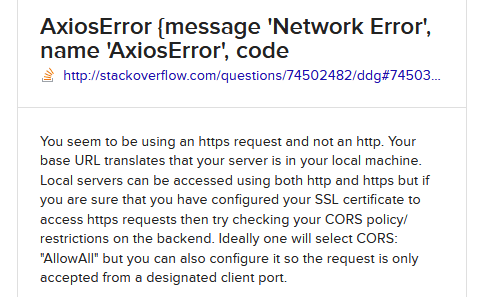
about 2nd issue, read tip that I found

info_3047_2025.gif
Seems to be related with SSL, and probably you don't have similar error on destination (real) domain.

Paul Frankowski Senior Staff

About Mobile Menu (fixed) , now you have to:

  1. Copy & paste that file from subdomain: /templates/themis/headers/style-2/header.php
  2. And copy content or file from here: /templates/themis/css/custom.css

and will be OK.

Log in to reply.