Configuration changes - Forum | JoomShaper
Solved Templates

Configuration changes

Asked by Charlotte Munch 2 weeks ago Last activity 2 weeks ago

Hi
I am working with the Terrae template and would like help with the following:

  1. How do I change the typography and colors of the wavy banner on the front page - see screenshot1

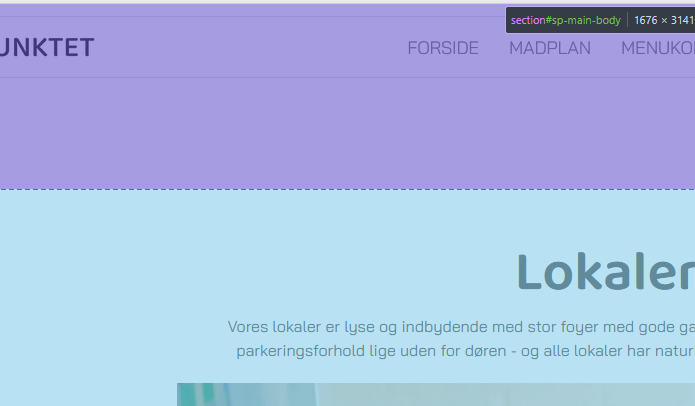
  2. I want to reduce the distance from the menu down to the header - see screenshot2. How do I do that?

best regards Charlotte

Accepted answer

Marked as the solution
Paul Frankowski Senior Staff

Super. Mark topic as solved. I updated also Template documenation adding those tips.

26 more replies

Paul Frankowski Senior Staff
2 weeks ago · edited

Hi Charoltte,

Your screenshot links are not correct, I see only error 404.

Anyway. I will try to guess.

ad 1) Use Custom CSS to change default code

.clip-style1 textPath {
  font-family: Bagel Fat One;
  font-weight: 400;
  font-size: 130px;
  line-height: 1.1;
}

Now your turn, change font name and font-size (!)

Then color, from green to white use

.clip-style1 textPath {
  color: #FFF;
  fill: #FFF;
}
Paul Frankowski Senior Staff

ad 2) Padding (purple) in Article view

space.jpg

You can reduce top-padding by using that Custom CSS

.view-article #sp-main-body {
  padding-top: 80px;
}

default value was around 185px

Charlotte Munch Asked this

Thanks for the answer!

I managed to change the style - but not to the font "Baloo Thambi 2" which I wanted!

I did not manage to change the color as the page crashed when I tried!

I can't find the ccs file where I need to reduce the top-padding. I have tried
template.css in the CSS folder
theme.scss / responsive.scss in the SCSS folder

Charlotte Munch Asked this

I would like to use the font "Baloo Thambi 2" (as in the main headline)
And the background of the banner should have the color #389433

And thanks for the good advice - the spacing is perfect now 👍

Paul Frankowski Senior Staff

New Font

.clip-style1 text, .clip-style1 textPath {
  font-family: 'Baloo Thambi 2', sans-serif;}

Background color (not green anymore, for example, transparent black)

.clip-style1 .waveClip {
 stroke: #000000b2; }
Charlotte Munch Asked this

The typography is correct now - but the background color should not be black - but green. It can be transparent, however.

Paul Frankowski Senior Staff

Are you sure that you used , I don't see sign of using it

.clip-style1 .waveClip {
  stroke: #224A1ED1;
}
Charlotte Munch Asked this

There you go - now it's there!
Thanks for the help......

Charlotte Munch Asked this
2 weeks ago · edited

Sorry - I have to reopen!
Because now I have problems configuring my off canvas menu - it doesn't work if I change the configurations under template styles

The background should be #FFFFFF
Text Color should be #252525
Hover Text Color should be Blue: #2C79A8
Active Text Color should be Red: e24417

And the whole menu should be left aligned!

And one more thing - I would really like to make a larger margin on the left and right on the mobile pages. The headline can end up going over the edges!

Can you help with that too?

Log in to reply.