

Sp-page-title Background Color
M
Mindsugar
Hi there,
i use the shaper_helixultimate - Default template with the current version of helix framework and sp pagebuilder. I just started using joomshaper tools and get along quite good with everything.
I wanna change the background color of sp-page-title from blue to another color.  Unfortunately I can´t find the place/option where to do that.
Can you pls help me out? Thanks in advance
Mindsugar
Website
http://localhost/bugu.eu
5 Answers
Order by
Oldest

Coldcut
Accepted AnswerHello Mindsugar, you have to change that using CSS. Add the following lines to your custom.css and adjust the colors to your needs:
.sp-page-title .sp-page-title-heading,
.sp-page-title .sp-page-title-sub-heading {
  margin:0;
  padding:0;
  color:#333;
}
Ofi Khan
Accepted AnswerHello Mindsugar
Please go to the menu item and change the color in Page Title settings.}
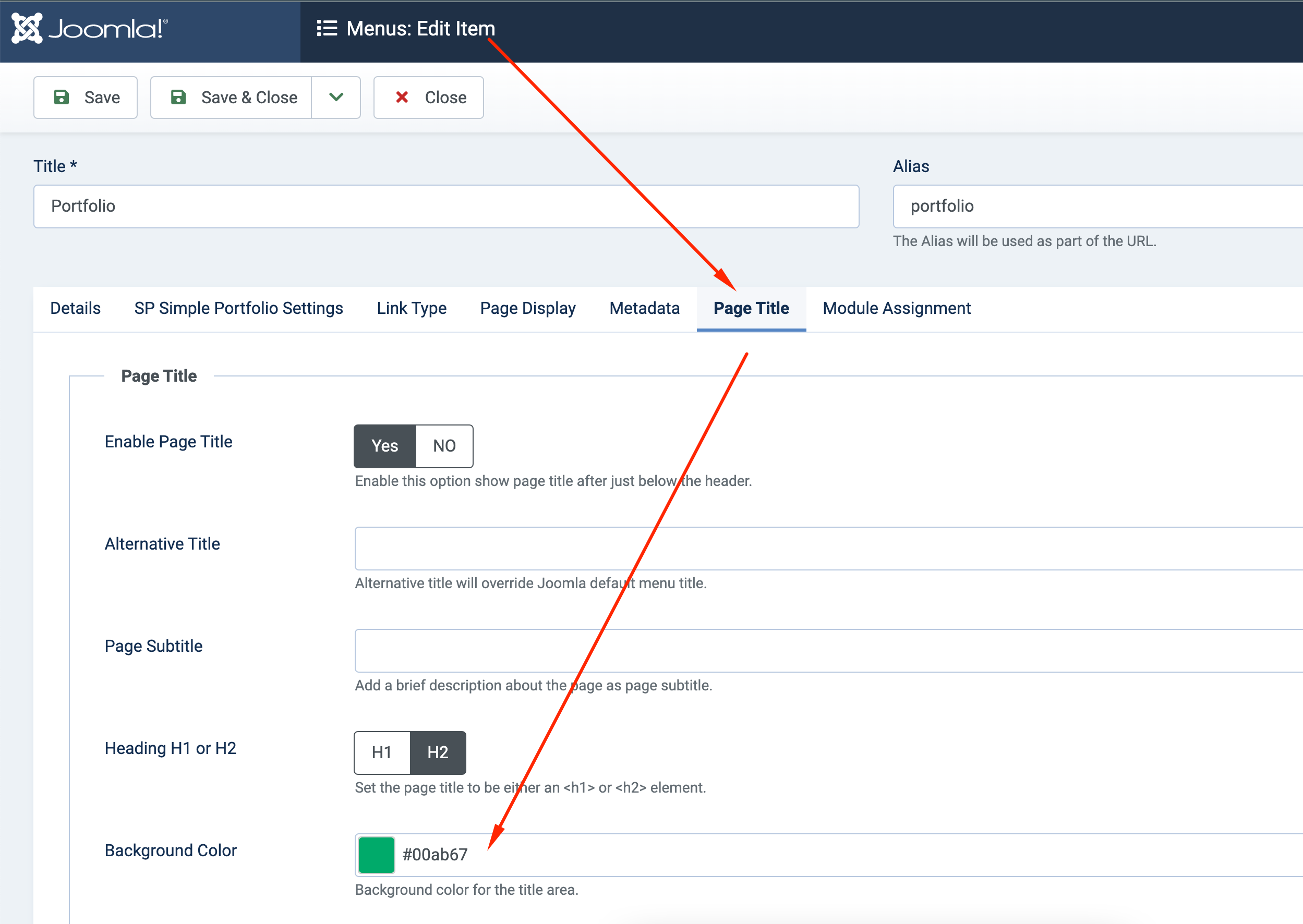
Best regards
M
Mindsugar
Accepted AnswerThanks for the prompt answer. I have been looking for a solution in the wrong place.
Since title-textcolor is white and the background is also supposed to be white, where can I change textcolor for this section?
Thanks
Mindsugar