

Mega Menu
D
Donna
Since this recent update of SP Pagebuilder and Helix Ultimate, the settings tab for mega menu in Joomla are gone!
Where do I find it now?
Website
http://pgrny.org
15 Answers
Order by
Oldest

Paul Frankowski
Accepted AnswerHi Donna, you should read Helix 2.0 documenation first, those settings in 2.0.x were moved into Template Options - Menu.
Guide: https://www.joomshaper.com/documentation/helix-framework/helix-ultimate-2/menu-navigation
D
Donna
Accepted AnswerThank you for your rapid response.
So does this mean I have to re-create those items and put them in the mega menu settings through the template now? If so, does that mean I have to remove them from the Joomla menu?
Or am I creating my own problems by using the Joomla menu as I have in the past?
Sorry, I am very confused.
Thank you, Donna
Paul Frankowski
Accepted AnswerAs you see all menu items are where you left them before Helix update. Just make changes in MegaMenu using "Menu" from Template Options. Every menu item should have icons - which redirect to settings.
Tomorrow I can create you short video guide, but I have to know what changes you want to make.
D
Donna
Accepted AnswerYou are wonderful!!
The section MORE, has a menu item of Special Awards has a sub menu of Four Chaplins Brotherhood. I want the Past Recipients to be the same level as the Four Chaplins.
What I really would like to do, is under Special Awards, have a menu item of Four Chaplins then sub menu of 2020 Recipient and at that same level a 2015 Recipient.
What I really am not understanding is why these menu items all show in the main menu and not down in the mega menu section.
Thank you so much again for all your help! Best regards, Donna
D
Donna
Accepted AnswerAlso, just noticed that all my headings over my heroes (top photos) have turned to black color and I cannot get them to change to white again with my dropshadow settings.
YIKES!!!
D
Donna
Accepted AnswerCreds sent.
I see where the mega menu shows the following menu items in the 'boxes' icon.
But why cannot I not change all my heading color over the graphics at the top of each page. They are black, they used to be white????
Thanks much, Donna
PS Please stay away from any forms. They are all working perfect and are very time sensitive and utilized 24/7. Thank you.
Paul Frankowski
Accepted AnswerAbout color of Headers as I noticed color should be set by SP Page Builder, you have to correct there in Row options. Using template options to change color of H1/H2 can make only bigger mess, believe me. Although h1 and h2 headers are black (#000) by default in template styles.
Now I will check MegaMenu
Paul Frankowski
Accepted AnswerIt's how it looks now
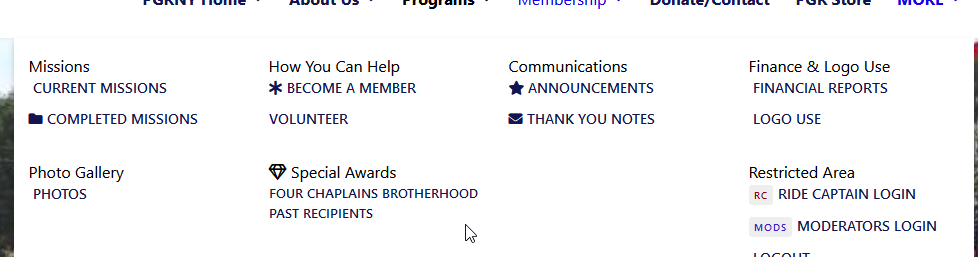
can you draw me on this what is still still missing or what should be moved?
D
Donna
Accepted AnswerPaul,
Thank you, I kept at it and figured it out. With exception to getting rid of all the icons next to the text.
What I still don't understand is your comment on setting colors. I use the Page Builder and put in a header over the graphic and applied a drop shadow. It is ignoring my add-on colors chosen now.
Any insight would be greatly appreciated.
Best regards, Donna
Paul Frankowski
Accepted AnswerIn theory, Icons you should be able to disable in MegaMenu inside settings.
About colors If you can share on page as exaple I would be able to check & suggest something.
BTW
I noticed that you added extra security layer to admin area, which is great, but I lost access.
D
Donna
Accepted AnswerOh darn, forgot about that.
I'll remove that extra layer.
I have now written CSS for the text-shadow on each page for the feature. So that is fixed.
The mega menu badges are still showing up and I cannot figure out how to remove the badge.
Now I'm getting calls and they are correct that the hamburger icon for viewing on phone or tablet blurs the page and never goes to the menu.
Please help. Donna
D
Donna
Accepted AnswerPaul,
I figured out how to do it. I actually picked new icons for the mega menu, saved them, and then deleted. It overwrote the badges I had there with the newer icons and then when I deleted the newer one, they all disappeared.
Strange way to have to accomplish this. I think it had something to do with the difference between what use to be available via the old mega menu in creating badges either custom, or the extensive list of font awesome images, as this is no longer an option that I could see.
Now for the off canvas menu to be fixed and I think I am in good shape.
Thank you for all your help. Donna